
Snapchat is a fun and fast way to connect with friends, share moments, and express yourself through Snaps, Stories, and chats.
However, not every interaction on the platform is positive or good sometimes, you may come across people who are annoying, intrusive, or simply not welcome in your digital space whether it’s a stranger spamming you, an ex you no longer want contact with, or someone making you uncomfortable, knowing how to block someone on Snapchat is an important step in protecting your privacy and maintaining a safe online experience.
Blocking someone on Snapchat is a quick and effective way to stop all communication from that person, if you blocked a person, they will no longer be able to view your accounts stories, they can’t send you Snaps or messages, or even find your profile in search results, it’s a useful feature that gives you full control over who can reach you and what they can see.
But if you don’t know how to block someone on snapchat, don’t worry because in this article i will guide you step by step how you block someone on snapchat however, you can do how to unblock them later if you change your mind.
What Happen When You Block Someone on Snapchat –
If you block someone from your Snapchat account, a person you blocked they automatically loss all connections from your Snapchat account like they can’t chat from you but this system not only limited on the chatting.
When you block someone on Snapchat account they can’t send you snaps, messages, they can’t able to view your Snapchat account story even they can’t see your profile information after blocking.
Even if you do chat in past with the person you blocked, the existing chat will automatically disappear from your account and your Snapchat account username is disappear in their Snapchat account search results.
So, this is the information of you block someone on Snapchat what happens in your Snapchat account and their Snapchat account who you blocked, by the way, blocking is the one of these best and stronger step, if you don’t want someone or a person don’t want you in your Snapchat account.
How to Block Someone on Snapchat –
If you wanna block someone from your Snapchat account from help of your smartphone device follow these simple steps –
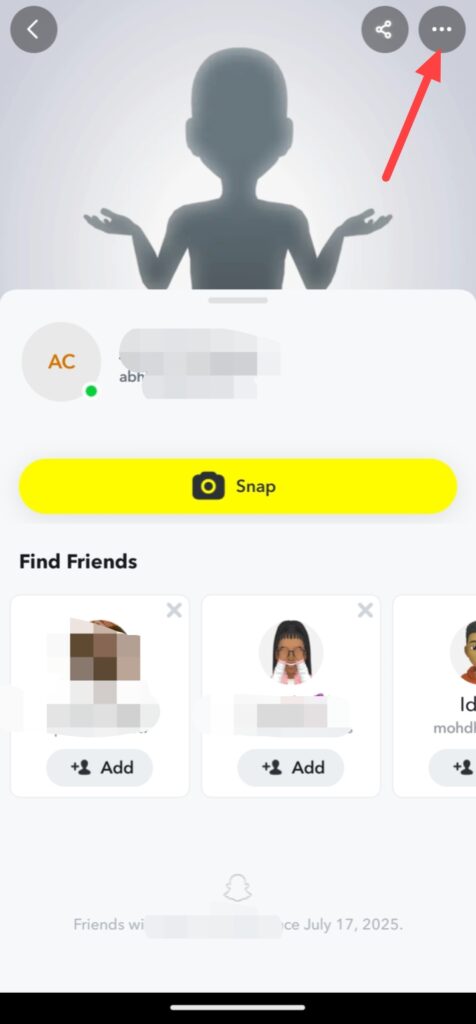
If you wanna block someone on Snapchat, first open your Snapchat app and go to the Chats and open them person chat whom wanna you block and click on their name and you can see their profile.
After this click on these three Dots.
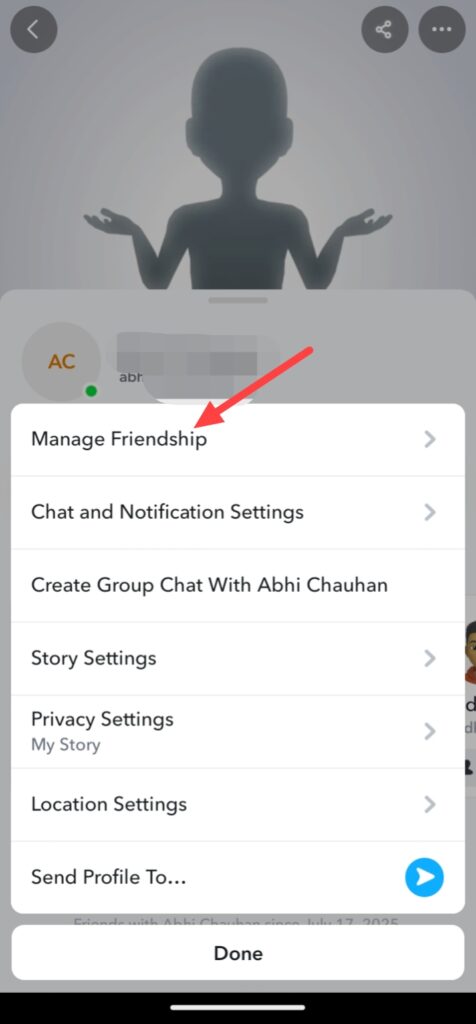
And you see a option that called Manage Friendship, click on this.
Then click on block, when you click on block you can see a popup again click on block.
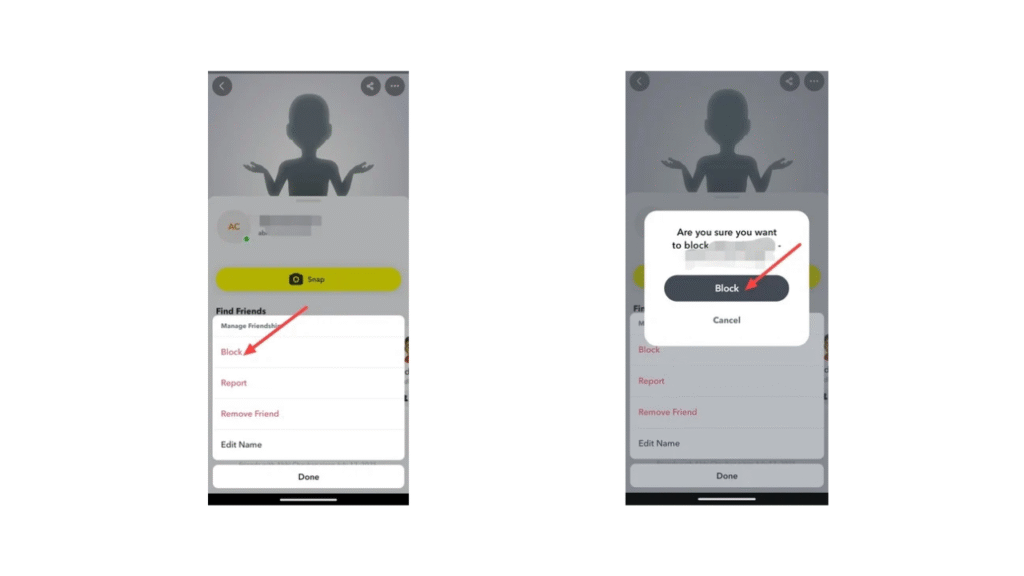
After doing these steps finnally, this person or profile is blocked.
So, this was the step-by-step guide for how to block someone from your Snapchat account from help of your smartphone device.
FAQ –
Question; Do people know when you block them?
Answer; No, if you block someone from your Snapchat account, they not take any type of notification of blocking.
Question; Can I remove a friend on Snapchat without them knowing?
Answer; Yes, when you remove a friend from your Snapchat account friends list, they can’t receive any type of notification, but when they not find you in their friends list then they know removed them from your Snapchat account friends list.
Question; What does green dot on Snapchat mean?
Answer; The green dot mean on Snapchat is not the showing a person online presence because some peoples think this, the green dot is a privacy feature thats helps you can see a persons camera or microphone is in currently use.
Question; Is there a way to delete a Snapchat message?
Answer; Yes, you can delete your Snapchat message, simply press and hold a message which you wanna delete then you can see a delete button simply tap on this button, your Snapchat message is deleted, but if you need clear guidence you can get from this article.
Conclusion –
In this article i provided you all information of how to block someone on Snapchat, available guide from help of your smartphone, i hope you easily understand how you can block someone from Snapchat, if you’ve any question about this article or our website you can ask in comment section.