
Blocking someone on WhatsApp is a quick and effective way to stop all communication from that person, if you blocked a person, they will no longer be able to view your accounts stories, they can’t send you photo , videos or messages, or even find your profile in search results, it’s a useful feature that gives you full control over who can reach you and what they can see.
I know and almost everyone knows WhatsApp is the most popular and useful social media app WhatsApp helps you can send unlimited messages from WhatsApp using internet and data without any charges.
And you can also use WhatsApp just for fun or your work, that means you can create your personal group to doing fun with your friends and family members and even your can create your own WhatsApp chennal like YouTube channel.
By the way, not every interaction on the platform is positive or good sometimes, you may come across people who are annoying, intrusive, or simply not welcome in your digital space whether it’s a stranger spamming you, an ex you no longer want contact with, or someone making you uncomfortable, knowing how to block someone on WhatsApp is an important step in protecting your privacy and maintaining a safe online experience.
But if you don’t know how you can block someone on WhatsApp, don’t worry because in this article I will share with you a step-by-step guide of how to block someone on WhatsApp, if you know this process, follow these steps.
Why you Wanna Block Someone from Your WhatsApp –
- When you block someone, you stop receiving unwanted messages and chats, after blocking also you cannot send them message or any other things, if you wanna send them, you will have to unblock them before sending.
- Someone time on your WhatsApp comes unwanted, unnecessary and unknown peoples and you don’t know them and they can do spam or fraud with you.
- Maybe, you know a person but you don’t want they always can do talk or any type of calls, that means you don’t know a person who comes in your personal boundaries, you wanna talk only them from your phone call or face to face.
- Some times maybe, you stop doing conversation a person in your real life because you have some personal reasons, that can be one reason you don’t want them, but after some time changing your mood or after your agreement.
So, these are the some reasons of why you wanna block someone on you WhatsApp account, these are just for example and I know everyone have different types of reasons, some are big and small.
What Happen When you Block Someone from Your WhatsApp Account –
When you block someone on WhatsApp, that means you cuts off your android their all contacts on WhatsApp, you and they cannot send you any messages, photos, videos or any type of things.
They and you cannot do any call of each other whether it is video call or voice call, and after blocking they can’t see your profile picture, your WhatsApp status even your online activity.
But when you block a person who chat with you in past, the chat history is not deleted after blocking but you can’t receive a new message and even you cannot receive any type of notifications from their side.
If you both persons are joined a WhatsApp same group, you can do chat on WhatsApp group even you can see each other chat, when you block someone on WhatsApp, the blocking effects only show in private or one-to-one chats, WhatsApp group blocking is different way, it is not have any relationship from WhatsApp group.
Keep in mind, when you block someone on WhatsApp, they not get any type of blocking message or notifications on WhatsApp because WhatsApp not provided this feature but they can only guess from your replies, profiles, status or talk.
But when you change your mind or your agreement, you can unblock them from your WhatsApp and you can start again doing chats, message, seeing status and profile.
Read Also – How to Create WhatsApp Account
Read Also – How to Create Group on WhatsApp
How to Block Someone from WhatsApp –
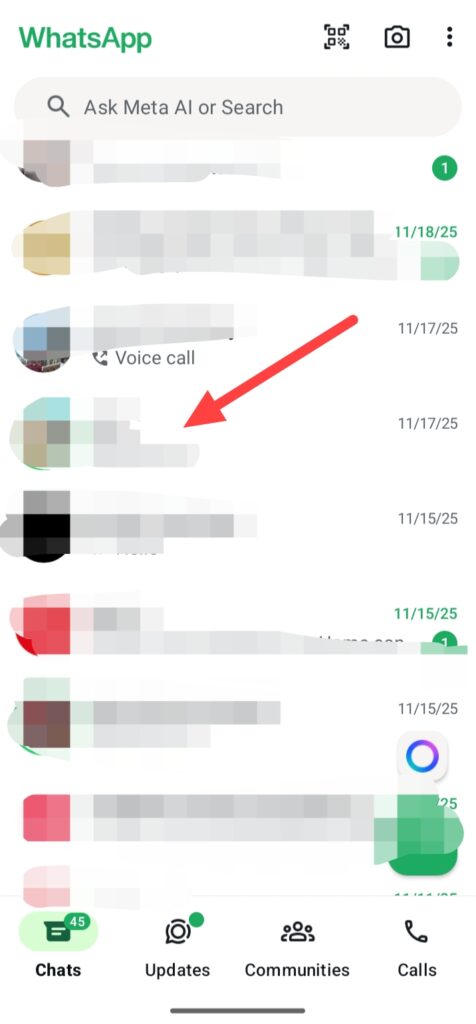
If you wanna block someone from your WhatsApp account, first open you WhatsApp and go to the chat section which person you wanna block.
For Example –
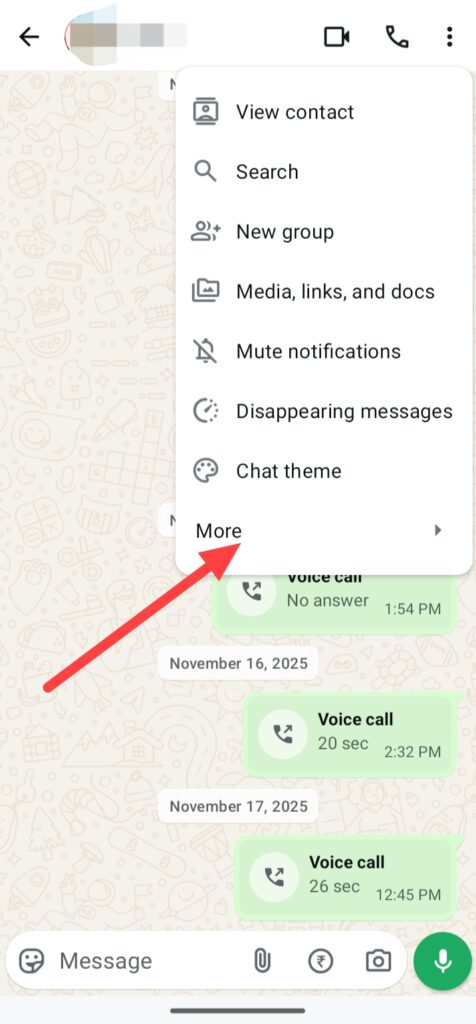
Then click on these three points, click on More option.
And you can see a Block option, simply click on this and click on Block.
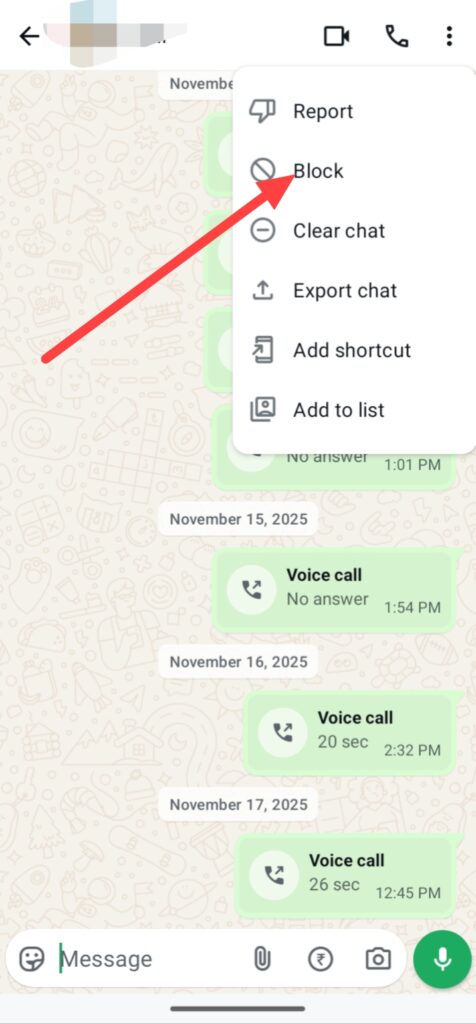
After doing this process you finnally blocked a person who you don’t want in your WhatsApp account but in future if you wanna start again conversation them you can also unblock from your account.
Even you can also see your block list, which means how many and which persons you blocked on your WhatsApp account.
Go to Settings > click on Privacy > click on Contacts, then you can see your Blocked contacts list.
FAQ –
Question; When you block someone on WhatsApp will they know?
Answer; No, when you block someone on WhatsApp, they will be not notified because this feature is not available but they can see some changes in own WhatsApp app or account like, not replying, not able to see your profile picture and not able to see your WhatsApp status.
Question; Can I block someone on WhatsApp without him knowing?
Answer; No, you can’t block someone on WhatsApp without knowing them because I’m initially you can do this but after some time when they open WhatsApp app and they see some changes on own WhatsApp app like not replying, not able to see your profile picture and not able to see your WhatsApp status, and they will know you blocked them.
Question; How many times can you block and unblock someone on WhatsApp?
Answer; By the way, at this time there is not any limit of how many times you can block nd unblock someone from your WhatsApp account.
Question; Can I unblock someone on WhatsApp after blocking?
Answer; Yes, after changing your mood or your agreement who you blocked, you can easily unblock on your WhatsApp and start again chatting.
Question; What changes I show on my WhatsApp when someone blocked me?
Answer; When someone blocked you on WhatsApp, you cannot see their profile picture, status, you can’t get any reply of message and even you can’t see their online activity like last seen.
Conclusion –
These are all step-by-step process of how to block someone on WhatsApp from help of your mobile and tablet, i hope you easily understand this step-by-step guide of how you can easily block someone on WhatsApp.
But in this article, i not only shared with you this step-by-step guide of blocking someone on WhatsApp, I also shared with you some reasons why you wanna block someone on WhatsApp even I shared with you what happen when you block someone on WhatsApp.
I know it is the simple process of blocking someone on your whatsapp account and you already know about WhatsApp, how it is big and how it is important in your daily life.
If you have any questions about this article or about our website you can ask me from comment section or also you can ask me from our contact form.
Read Also – How to Share Location on WhatsApp
Read Also – How to Create Poll on WhatsApp
Read Also – How to Get Backup on WhatsApp