
If you wanna grow your audience or business facebook page is the most effective way to build your business online presence because in this internet world your is most necessary to go online, if your business is not online maybe, it is not grow well.
With facebook page you can need to publish content, grow your audience build a good customer base and even are more benifits is facebook page.
If you don’t know how can you i create facebook page, don’t worry, in this article I will show you how can you create a facebook page, I will guide step-by-step and you can see Web and Phone both process.
Benifits of Creating Facebook Page –
- After creating facebook page you can increase your online presence like your personal brand or business.
- You can see insights and analytics to see improve your content or product.
- You can run facebook ads and target your right audience in detailed to promote your products, services, content and other things.
- You can build a loyal community through groups, live videos, events, and consistent engagement.
- You can respond to questions, handle complaints, and provide customer service directly through Messenger, comments, and automated replies.
Difference Between Facebook Account and Facebook Page –
Facebook Account – If you create a facebook account or profile, you can see the it clear difference in facebook account and page because a facebook account or profile is called (person profile), you can use it to connect with friends and family, share personal updates, photos, and videos, you can have up to 5,000 friends, and people need to send or accept friend requests but for managing facebook page is must you have a facebook account because if you have not any facebook account you can’t create a facebook page.
Facebook Page – Facebook Page is designed for businesses, brands, public figures, and organizations, if you wanna promote your personal brands or business trough videos, photos, events and even more ways are available to promote your brand or business on facebook page, you can monetize your facebook page and you can earn money, you can add unlimited followers, even you can get your facebook page access to analytics, advertising tools, and business features like shop, appointments, reviews, and more.
How to Create Facebook Page from Phone –
If you wanna create a new Facebook page from help of your smartphone device follow these steps –
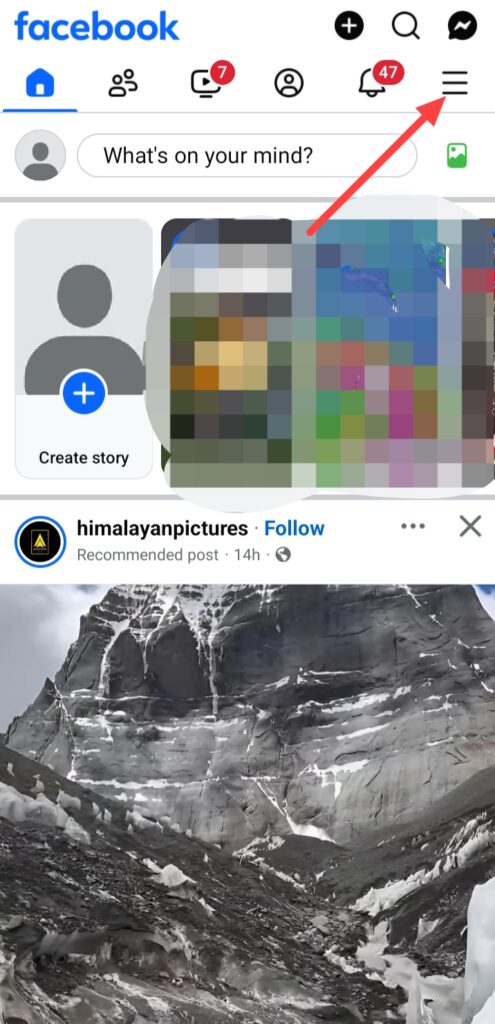
If you wanna create facebook page from your phone, simply open your facebook app and login your account, after login your account you can see this interface, click on this three lines.
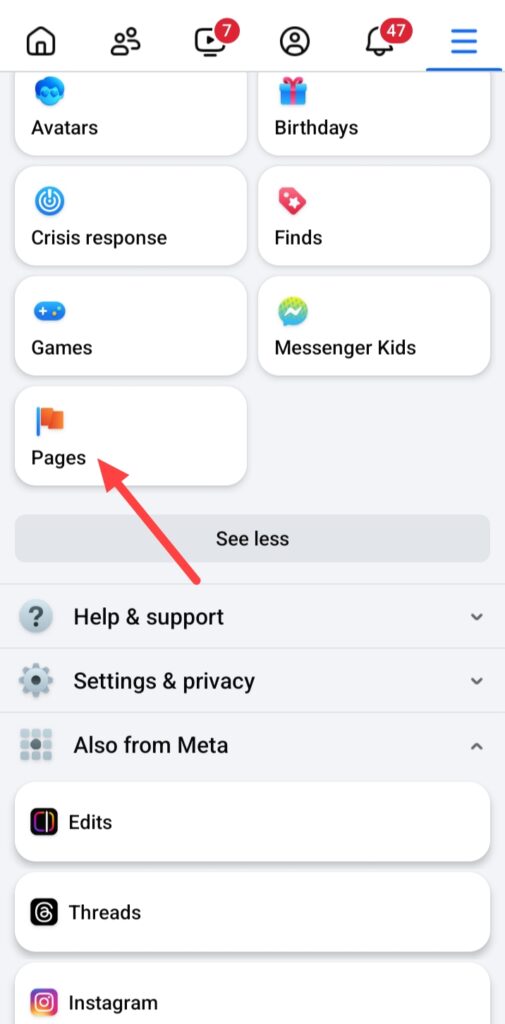
And click on See more then click on Pages.
After click on the Pages, click on the Create.

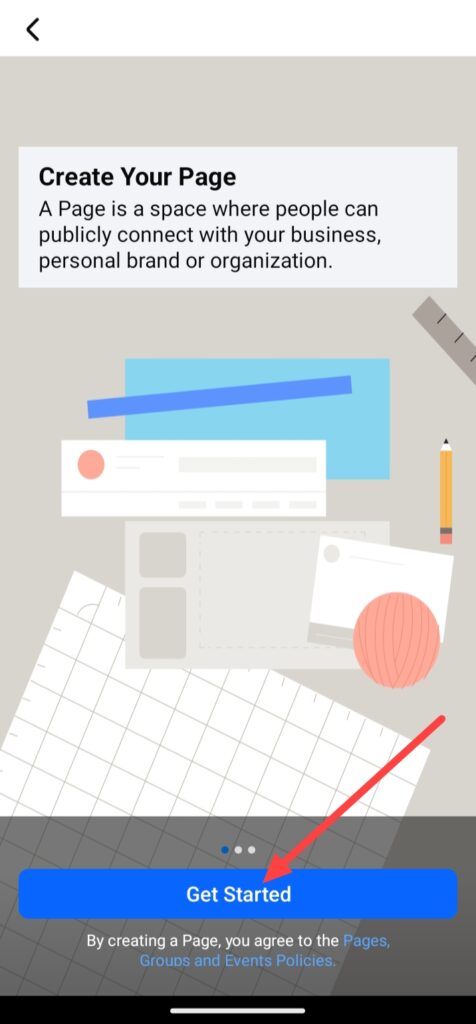
Click on the Get Started.
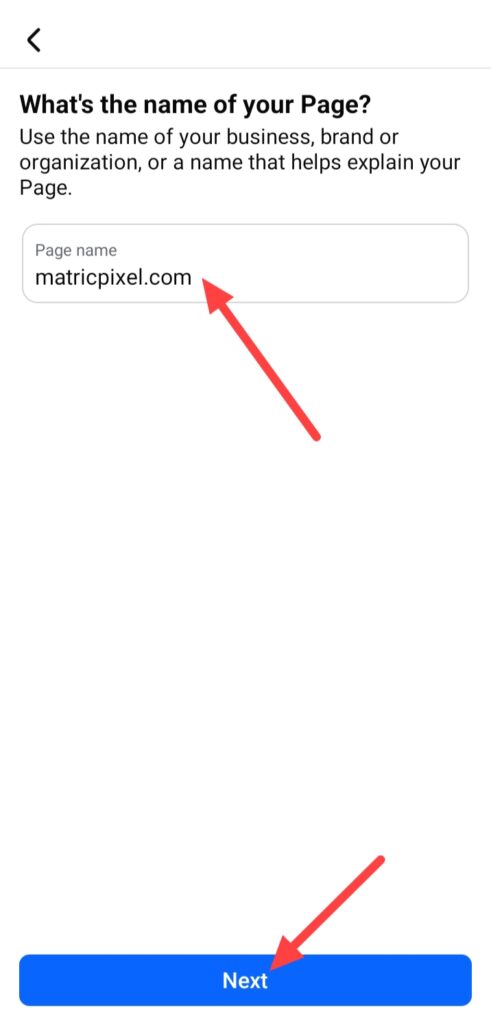
Add your Page name and click on Next.
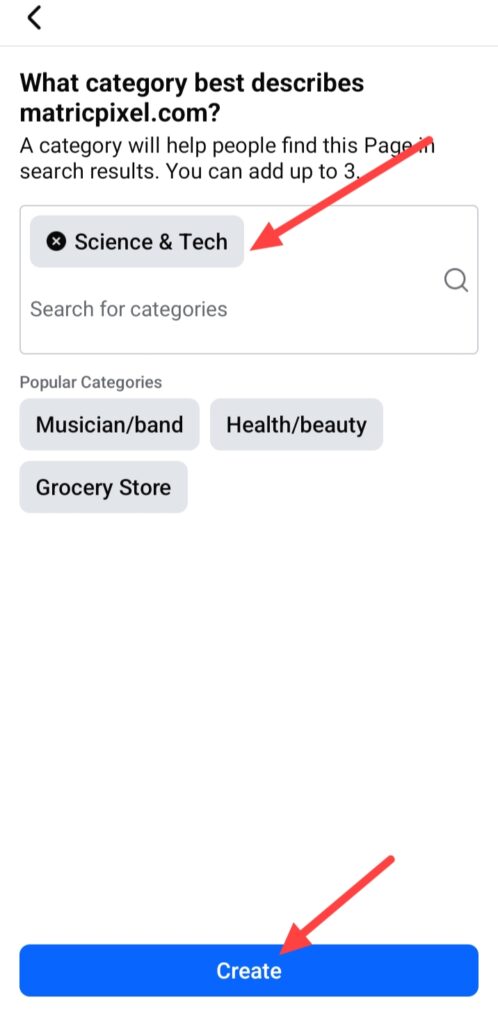
Choose your category and click on Create.
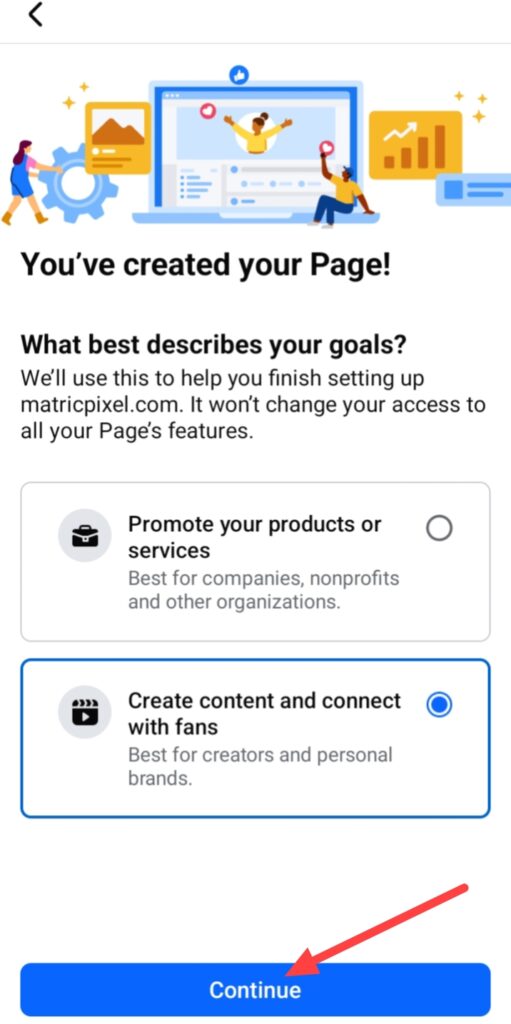
After clicking on this, describe your goal, you can choose this according to you then click on Continue.
After describing you can fill information according to you, at this time I will skip this step, you can do this after creating page, simply click on the edit and you can fill up your business information.
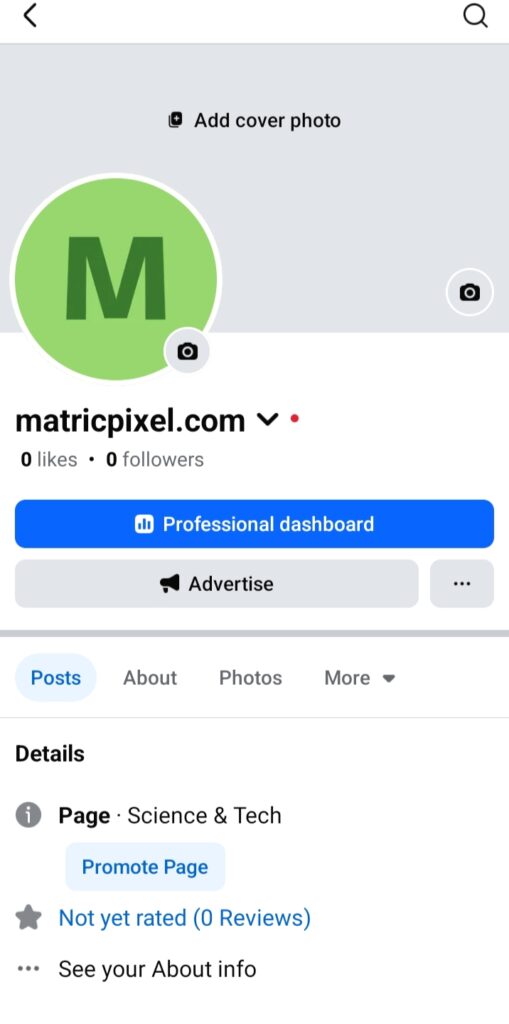
Finally, your facebook page has been created.
How to Create Facebook Page from Web –
If you wanna create a new Facebook page from help of your computer or laptop follow this step-by-step guide of how to create a Facebook page from web –
If you wanna create a Facebook page from your computer, simply you will have to open any web browser like Google Chrome, Microsoft Edge, Firefox or any other web browser you can use.
Then open Google on your web browser and search Facebook after doing this click on the facebook and login your account, remember you need login only same account which in account you need to create your page.
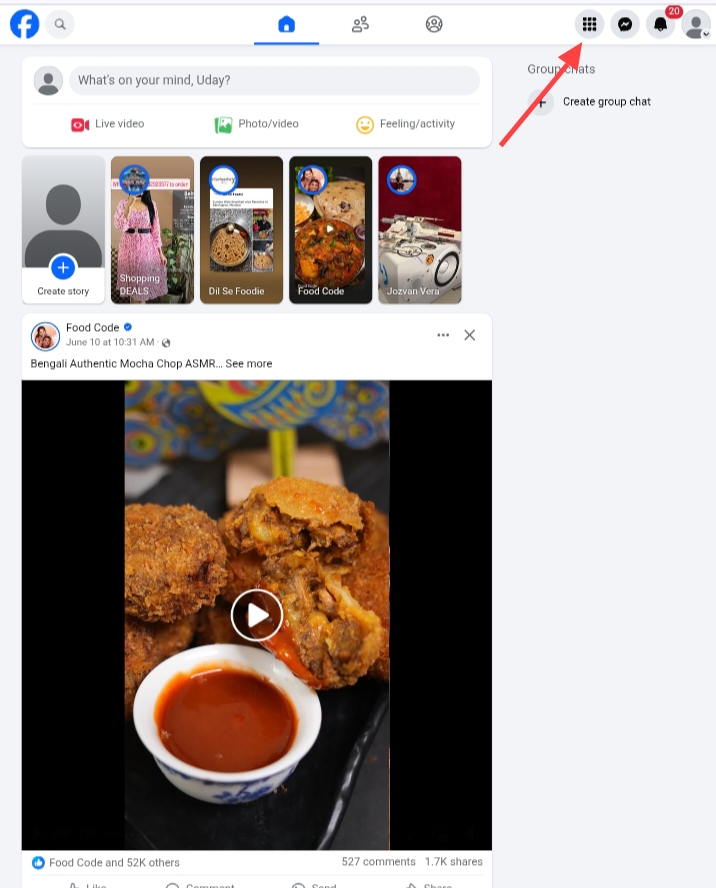
After doing this you can see this page, click on this six dots and click on Pages.
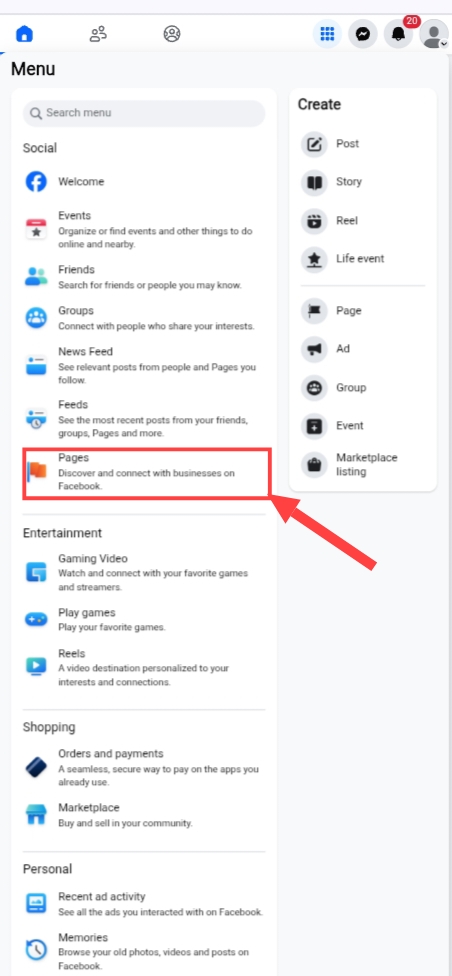
Then click on the Pages.
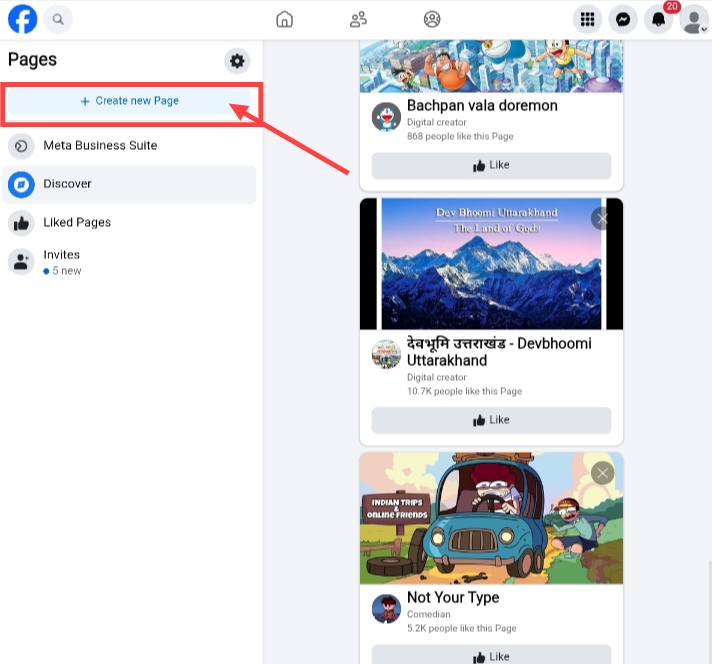
And click on the Create new Page.
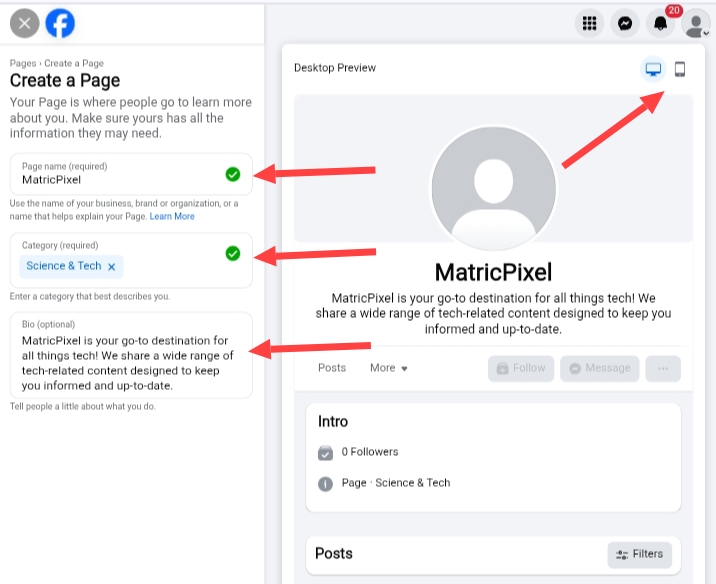
After click on the Create new Page you will see this type of interface, you will have to enter your Page name, Category and Bio like this image, it is just for example, and you can see your facebook page how looks in web and mobile.
Then click on Create Page.
When you click on Create Page, you can see this types of interface, you need to add your business details and go Next option or you can click on the Next to Next and you can skip this step, you can fill this information after creating facebook page.

In this case I skip this step, you can do fill your page information or you can do this work after creating facebook page, simply click on the Edit button you can add your information on your page.
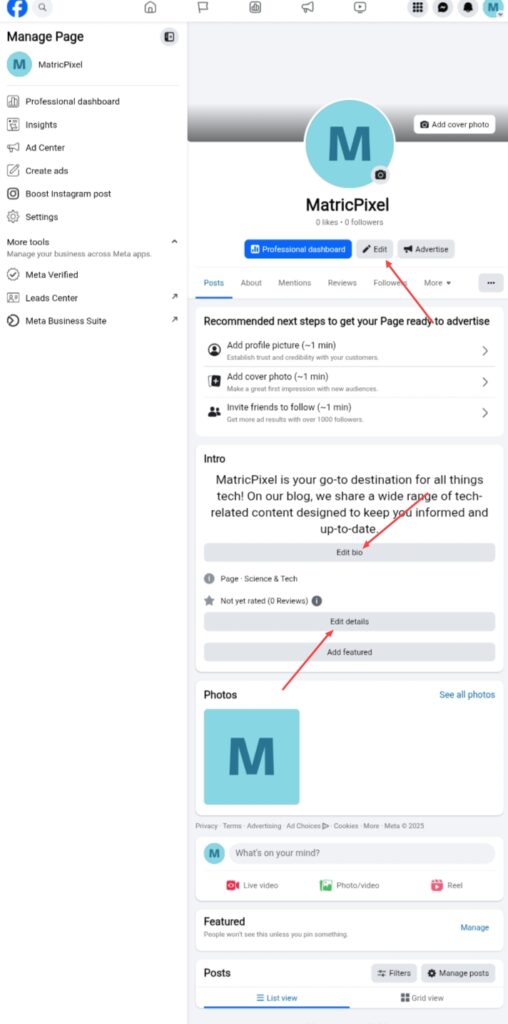
Finally, your facebook page created successfully, you can do changes according to your needs, you can see Professional Dashboard, Insights, you can run ads and even more things you can do.
FAQ –
Question; Is creating a page on Facebook free?
Answer; Yes, creating Facebook page is completely free and simple, you can do this work easily after reading this article.
Question; Which is better, a Facebook profile or page?
Answer; If you wanna grow your business, organization, personal or you need global audience for your content Facebook page is the best for you, but if you don’t motive of these things you can use Facebook profile because Facebook profile is the best for your personal use.
Question; Can I have a Facebook page without a profile?
Answer; No, you can’t create a Facebook page without Facebook account or Facebook profile, you need your Facebook profile is must to create a Facebook page.
Question; Can you delete a Facebook page without deleting your personal account?
Answer; Yes, you can easily delete your Facebook page without deleting your Facebook account, you don’t need to delete your Facebook account for delete Facebook page.
Question; Do Facebook pages pay money?
Answer; Facebook page not randomly pay money, but if you wanna earn money from your Facebook page, check your monetization eligibility in your Facebook page.
Conclusion –
In this article, I have shared with you, how to create facebook page, that helps you can easily understand how you can create a facebook page for your business, organisation and personal brand, if you have any question about this article or matricpixel you can ask in comment section.
And I hope you clearly and easily understand of these both guides of how to create facebook page from help of your smartphone and from help of your computer or laptop.