
Snapchat is a one of the most popular social media app comes with over one billion downloads on google play store, this app comes with many of useful fun features thats helps you can connect with your friends and family members and making fun.
With this app helps you can do lot of things such as you can share your location to connecting with your friends and family members and sharing snapchat location is can be most important and useful on some places because sometimes you find some person in a new place or also location sharing is the best and safe way to tell your friends or family members where are you available and safe.
No doubt it is a useful social media platform, your photo and videos or important talks and you can do messages and you can use story feature, it best way to share or things you wanna show with your friends and family members but you don’t send them and more.
You can use snapchat not just for entertainment or fun purpose you can also use this social media app for your personal branding, your business purpose, organization and any other ways, you can use this, on this app available mot of the youth and snapchat have daily 460 million users activity use this app, thats the reason why I ask you for promoting your business or brand.
After this you wanna create your snapchat account but you don’t know or you already search how to create snapchat account don’t worry, in this article i will share with you how you can create your own snapchat account, i will guide you step-by-step with phone and web both ways.
Benifits of Creating Snapchat Account –
If you create Snapchat account and you wanna know what is the benefits of creating Snapchat account, you can see here –
- Snapchat account helps you can do instant communication from your family and friends and you send photos, videos, messages and more, you can make quick fun.
- Snapchat helps you can share your personal customized photos, videos or snaps to your friends, family or your audience you can use filters, lenses, stickers, and Bitmojis and even more.
- On Snapchat available a large amount of filters and stickers.
- Even on Snapchat you can share your live location and current location with your trusted friends and family members or someone else.
- You can be stay updated with your interest trending topics, news, and original shows from publishers and creators.
- You can enjoy the interactive filters and lenses who powered by advanced AR (Augmented Reality) technology, it is the most popular, advance and useful technology overall world.
How to Create Snapchat Account from Phone –
If you wanna create your Snapchat account from help of your smartphone device follow these simple steps –
If you wanna create Snapchat account from your phone, first download the Snapchat app and open in your mobile phone then you can see this interface simply click on the Sign Up or you can do Countinue with Google but in this guide i will show you without google.

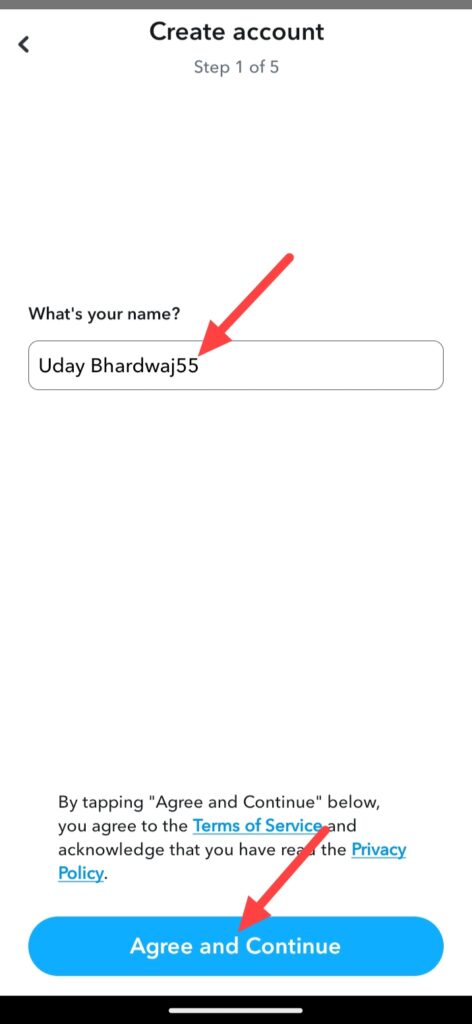
Then you can see this interface, enter your name and click on Agree and Coutinue.
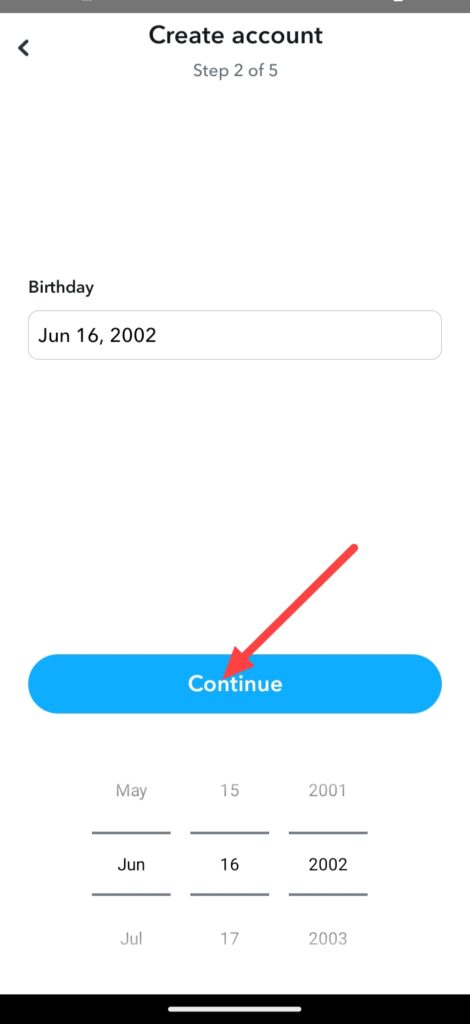
Then enter your Birthday and click on Coutinue.
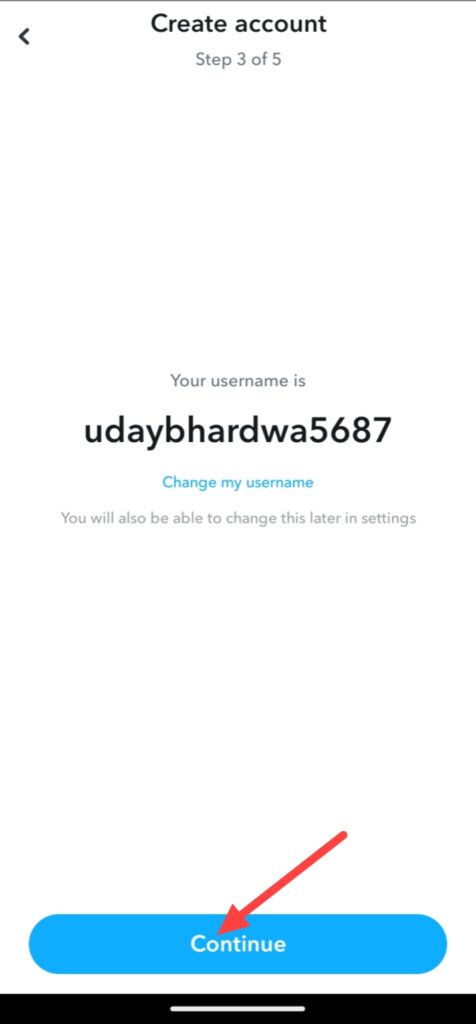
And you can edit or change your username if you don’t like your default username, just clicking on Change my username but in this case we click on the Continue.
Set your Snapchat strong account password according to you and click on Continue but if you wanna save your Snapchat password in your device, click on the Save Login Info on your device, but if you wanna no remove check mark from this.
Then you can see this interface, you will have to do connect your Snapchat account to your phone number or email, if you wanna do from phone number click on the Use phone number instead but in this case we use email and click on Coutinue.
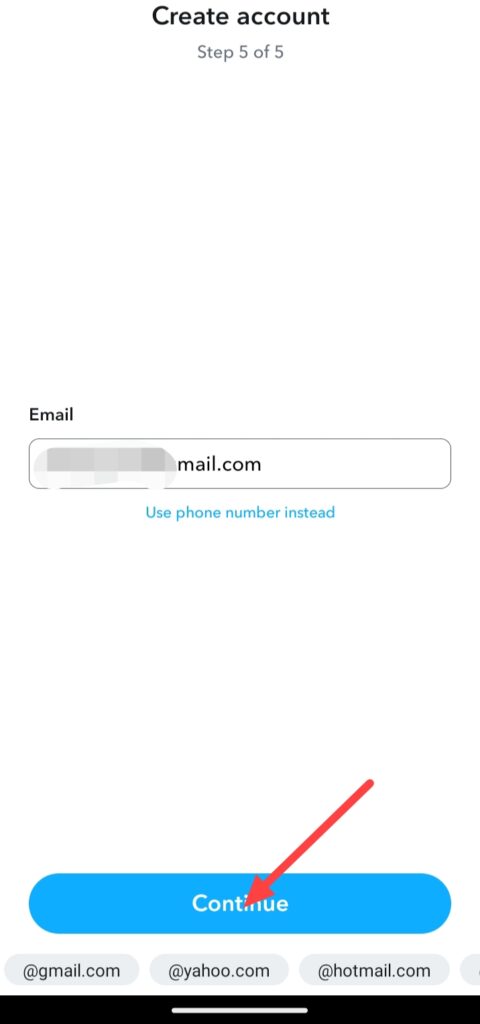
Finally, your Snapchat account created, you can do skip these some steps after creating snapchat account or you can do setup your Snapchat account.
So, this was the step-by-step guide for how to create Snapchat account from help of your smartphone device.
How to Create Snapchat Account from Web –
If you wanna create Snapchat account from help of your computer or laptop follow this step-by-step guide of how to create Snapchat account from web –
If you wanna create Snapchat account on web, first open your web browser and search on google Snapchat web then click on this link https://accounts.snapchat.com/v2/signup and you can see this type of interface.
It is a Snapchat account creation form, in this form fill your name, birthday username, password and click on the Agree and Coutinue.
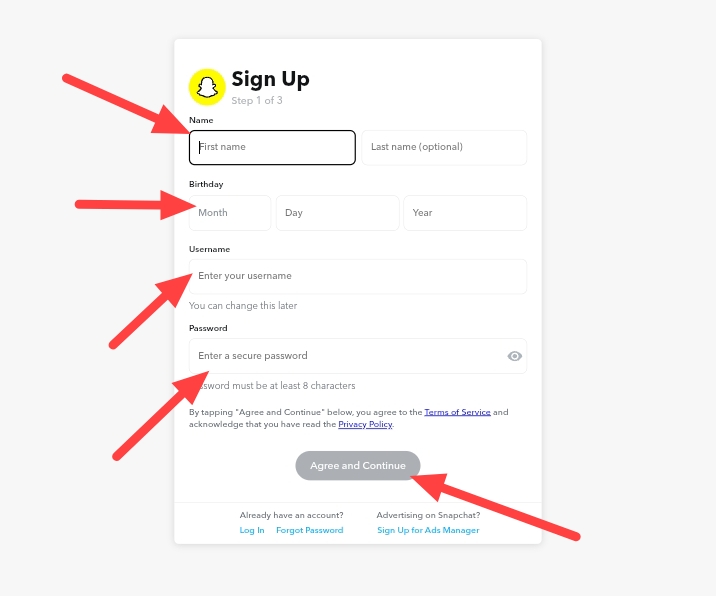
After filling this form and clicking on the Agree and Coutinue, you will have to do email in your Snapchat account enter your email and click on the Next.

And after adding email and click on the Next, you get a code in your mail enter this code in form and click on the Next.
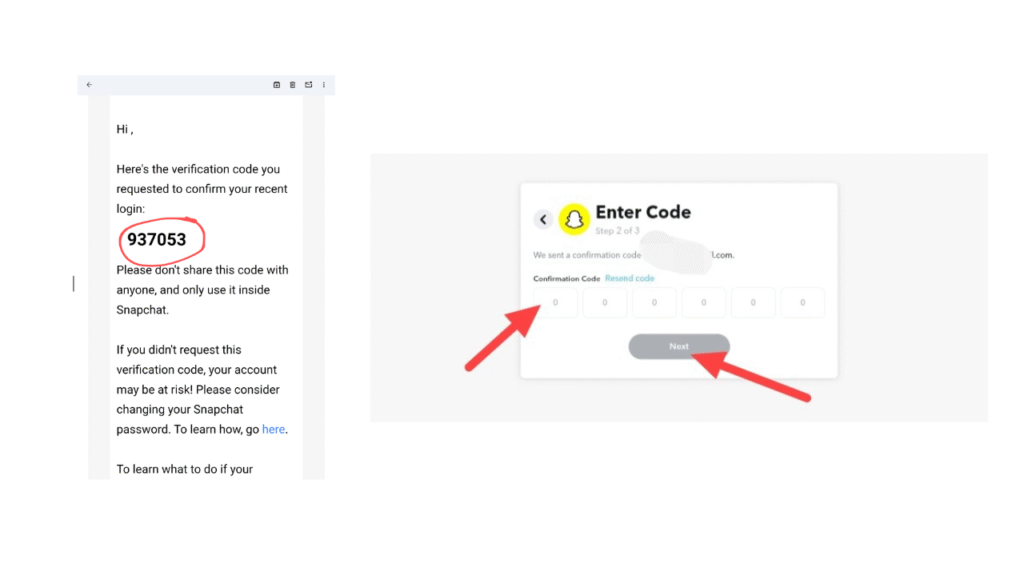
Finally, your Snapchat account is created.
So, this was the full step-by-step guide of how to create your Snapchat account from your computer or laptop with using any web browser like Google Chrome, Microsoft, Firefox or any other browser.
FAQ –
Question; Can you create a Snapchat account without a phone number?
Answer; Yes, you can create a Snapchat account without using any phone number even you can use your Snapchat account without adding any type of phone number.
Question; How to create a new Snapchat account?
Answer; Simply download the Snapchat app from your play store app, open the app enter on signup and add your name, birthday and create a new username for your Snapchat account, but if you wanna need clear guidence on this topic with using computer and mobile read this article.
Question; Which things I need to create a new Snapchat account?
Answer; You don’t need any difference things to create a new Snapchat account in your device, simply you need a smartphone or laptop which you choose and a WiFi connection, Snapchat app or if you laptop you need a web browser.
Question; Is Snapchat free in India?
Answer; Yes, Snapchat is free india but both versions are available free and paid, if you need more advance features or facilities you can buy premium subscription.
Question; Is Snapchat used for flirting?
Answer; Yes, lot of peoples use Snapchat is just for using or add filters in own photos and videos, you can also use snapchat is just for using filters.
Conclusion –
In this article all process i provided you how you can create your Snapchat account from help of your phone and laptop or computer, these both ways are available, i hope you easily understand how to create Snapchat account, if you’ve any question about this article or our website you can ask in comment section.