
Everyone knows or everyone use the worlds most popular and useful social media app WhatsApp because in this internet world WhatsApp is the one of the most popular chatting app, almost every person use this app who own a smartphone and internet connection to connect with their friends and family members.
Because WhatsApp helps you can do personal or professional communication, share your photos, videos, GIFs, PDFs and even more, also you can create a personal or public group and channel on WhatsApp to take your benifits.
If you wanna connect with your friends and family members but you don’t have whatsapp in your smartphone or you don’t have whatsapp account and you don’t know how you can create a new WhatsApp account.
Don’t worry because in this article I will share with you how to create WhatsApp account with help of a smartphone or tablet.
Benifits of Creating WhatsApp Account –
- You can send unlimited messages from WhatsApp using internet and data without any charges, I know everyone knows this.
- WhatsApp helps you can create your personal group to doing fun with your friends and family members and even your can create your own WhatsApp chennal like YouTube channel.
- WhatsApp helps you can connect peoples from different countries or globally without any international SMS or call charge and even you don’t need any additional charges to pay WhatsApp.
- You can use WhatsApp for promoting your business, you can use WhatsApp business to promoting your business, simply you can create store on WhatsApp business app.
- WhatsApp helps you can’t only send or receive photos, videos, GIFs, documents or any other things, you can also send or receive location on WhatsApp, if you can’t use phone calls or text messages.
- WhatsApp is worked in all devices like you can use in your smartphone, tablet, chromebook, dekstop or laptop.
What Things You Need to Create WhatsApp Account –
Creating account on WhatsApp you don’t need any hard or different types of things, you need some basic things like –
Device – You need a device like smartphone, tablet, chromebook, laptop or desktop.
Phone Number – You need a valid and active phone number who receive the verification code on your device.
Internet – You need a good internet connection, you can use Wi-Fi or you can use your mobile data.
WhatsApp App – You need a WhatsApp app in your device you can download from Play Store or App store.
To creating a new WhatsApp account you need these all things, I know you already have these all basic things.
How to Create WhatsApp Account –
If you wanna create a WhatsApp account, first download the WhatsApp app from your google play store, then open the app.
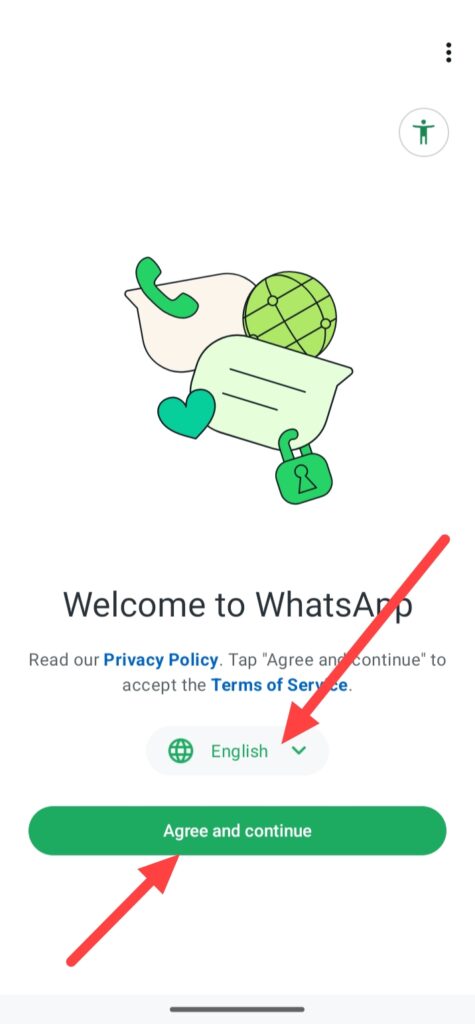
When you open the WhatsApp app you can this type of interface, simply click on Agree and coutinue and even you can select your language.
After clicking on Agree and coutinue, enter your mobile number and click on Next.
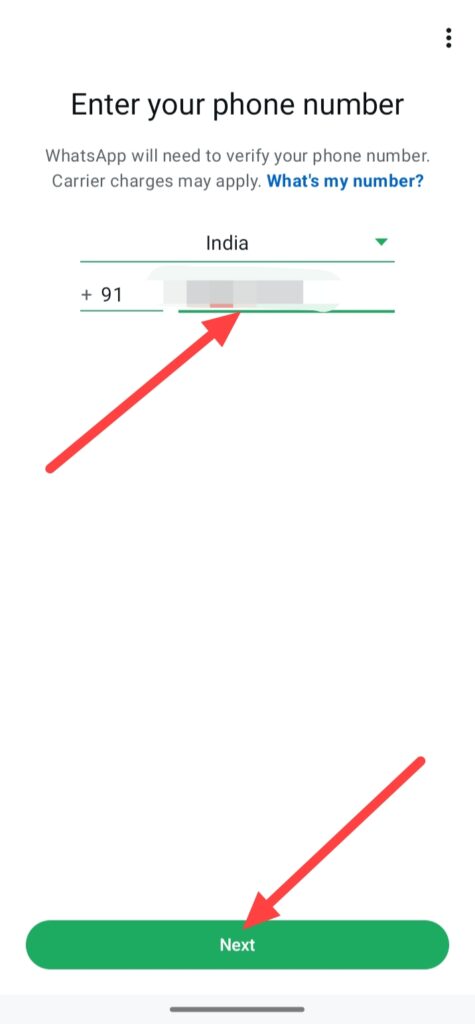
When you click on Next, you get a OTP number in your phone simply enter the one time password and click on Next.
And enter your WhatsApp profile info like your name, profile picture and click on Next.
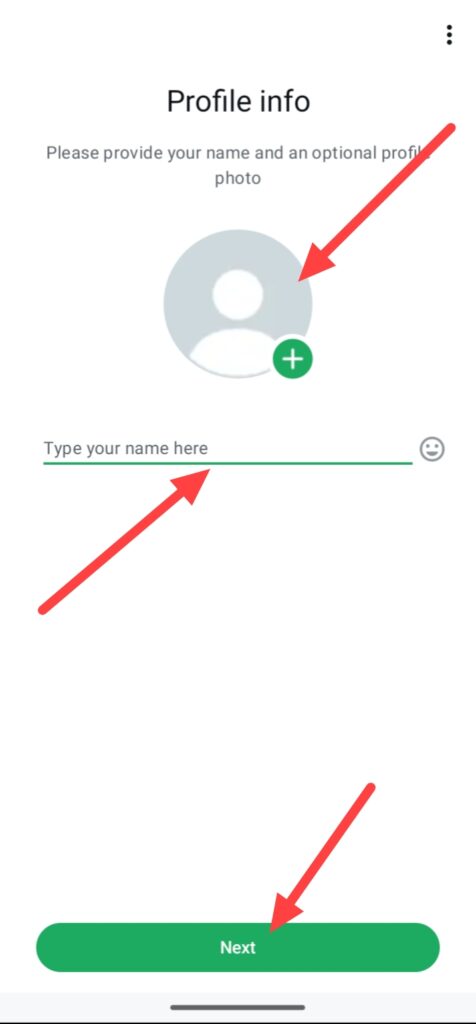
When you click on Next button and finally your WhatsApp account is created, it is ready to access and you can do chat or conversation with your friends and family members.
FAQ –
Question; Can I create a WhatsApp account without my phone?
Answer; No, you cannot create a account on WhatsApp without any phone number, it is mandatory to enter your mobile number for creating WhatsApp account.
Question; Can I receive a WhatsApp verification code by email?
Answer; Yes, you can receive a WhatsApp verification code on your email account but this way only works when you already add your email in your WhatsApp account.
Question; Is share your location on WhatsApp is the safest way?
Answer; Yes, share your location to other person or group from your WhatsApp is the safest way even live location and also current location is the safe if your share to someone.
Question; Can I activate WhatsApp without OTP?
Answer; No, you cannot activate a WhatsApp account without entering OTP because WhatsApp not allow to create account without phone number and activate account without OTP, because it is safety and privacy reasons.
Conclusion –
So this is the step-by-step guide of how to create WhatsApp account from help of your smartphone or tablet, i hope you understand this WhatsApp account making process easily.
In this article I was not only show you how you can create WhatsApp account, also I share with you benifits of creating WhatsApp account or benifits of using WhatsApp and which basic things you need to create a WhatsApp account.
I know it is the simple process to create a whatsapp account and you already know about WhatsApp, how it is big and how it is important in your daily life.