

WhatsApp is the one of the most popular and daily useful social media application, this thing is everyone knows, but WhatsApp not only offers you some basic features like share photos, videos, documents or anything and not only allowed you to calling someone.
Everyone knows it is the one of the best way to connecting with your friends and family members but WhatsApp group gives you some different way of connecting peoples.
Because help of WhatsApp group you can do chat with multiple peoples at the same time, whether you have a your family group or you have a your friends group for making fun or you have your some office or other, with help of WhatsApp group you can easily chat with multiple peoples at the same time.
But creating a WhatsApp group from help of your mobile device or teblet is not hard, it is just a simple process, if you don’t know this process, don’t worry because in this article I will share with you step-by-step process of how to create WhatsApp group.
Benifits of Creating WhatsApp Group –
- WhatsApp group helps you can chat with multiple peoples at the same time and if you have a WhatsApp group you don’t need to send a document, image, video or other things to different-different persons, you can send a document, image or video from multiple peoples at the same time.
- You can plan your events like weddings, meetings, trips or any other type of event with using WhatsApp group conversation easily and time saving.
- As a admin you can do full control on your all group chat, restrict messages, you can manage participants, thats means no one break your WhatsApp group rules who created you.
Read Also – How to Create WhatsApp Account
Read Also – How to Share Location on WhatsApp
Read Also – How to Create Poll on WhatsApp
How to Create WhatsApp Group –
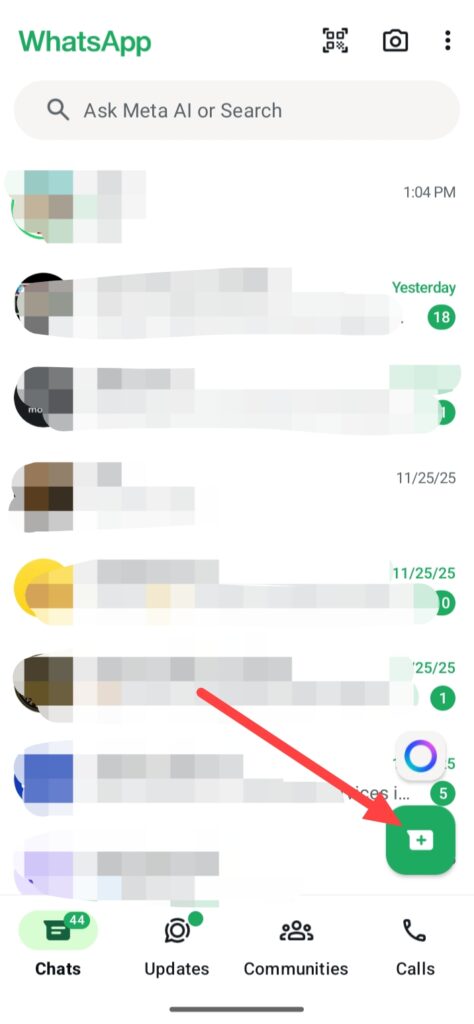
If you wanna create group on WhatsApp, open your WhatsApp app and click on this plus icon.
Then click on the New group.
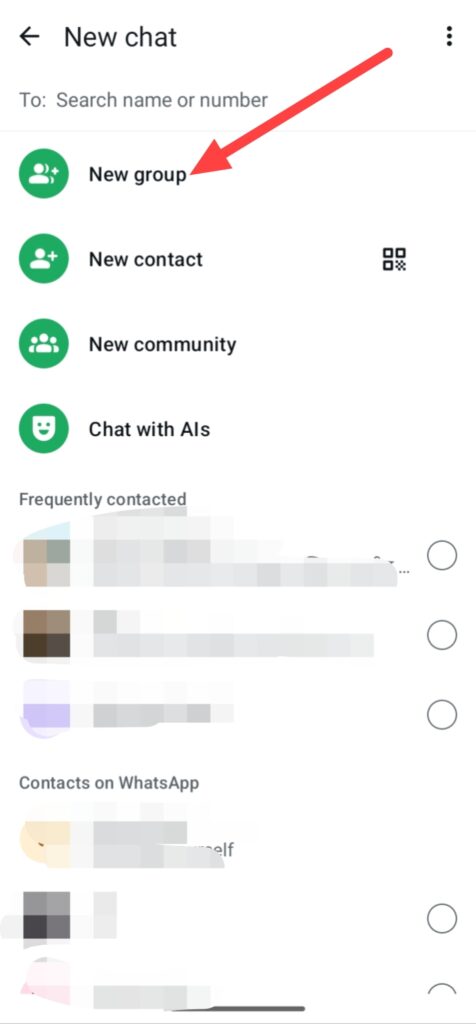
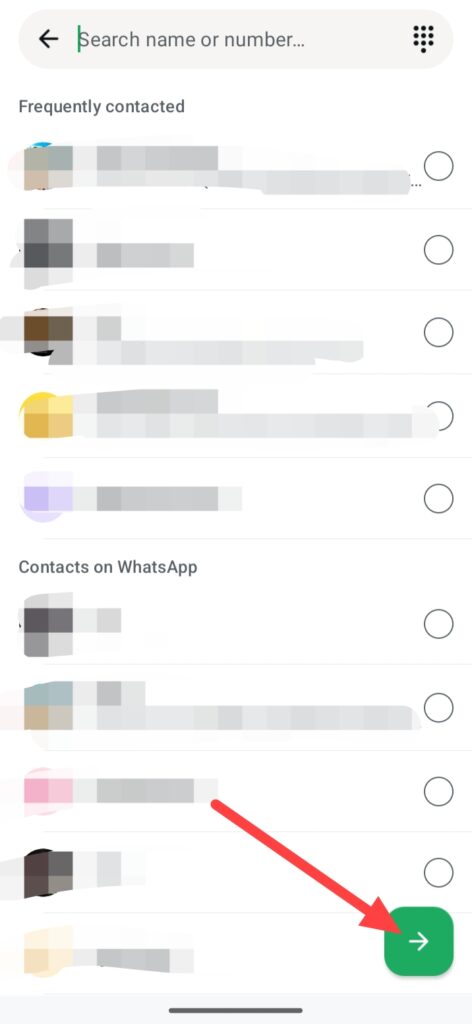
And select peoples or contacts which persons you want in your WhatsApp group, you can also find them by searching name or number.
After selection click on this green button.
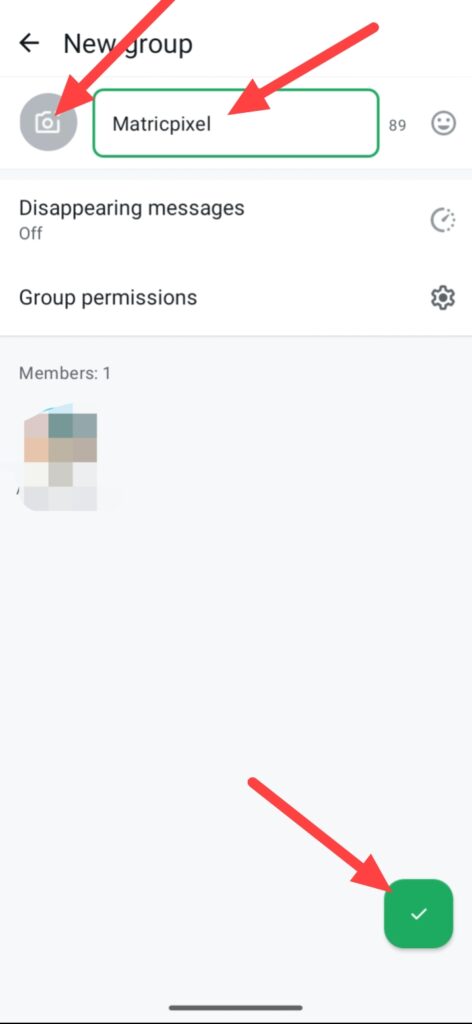
After click on this green button you can see this interface, simply add your WhatsApp group name and even you can add your WhatsApp group profile clicking on camera.
And click on this green tick.
When you click on this green tick icon and finally your WhatsApp group is ready you can see this group in first line of your WhatsApp, you can also edit this according to your needs and you can see how many and who person is join in your WhatsApp group.
Also you can send them your WhatsApp group link or QR code to join your WhatsApp group.
FAQ –
Question; How many peoples can I add a WhatsApp group?
Answer; You can add maximum of 1,024 people in a WhatsApp group, but before you can add only 512 peoples in a WhatsApp group, this limit is increased.
Question; What are the different types of WhatsApp groups?
Answer; By the way, WhatsApp groups are available in different types according to peoples need like informal groups like Family and Friends, work-related Colleague groups, or interest-based Hobby groups, you can also create a group according to your needs and interest.
Question; Can I receive a WhatsApp verification code by email?
Answer; Yes, you can receive a WhatsApp verification code on your email account but this way only works when you already add your email in your WhatsApp account.
Question; Can admins see your number in WhatsApp group?
Answer; On this topic WhatsApp Says – To protect your privacy when you join a community, your phone number is only visible to community admins, people who have saved you as a contact, and people who have your number from other chats.
Question; Can anyone join a WhatsApp group?
Answer; WhatsApp have different types of groups, for joining in some groups you need a request to join, in some groups you can join easily or right away, but joining in some groups you need to ask group admin for join group.
Conclusion –
So this is the step-by-step guide of how to create WhatsApp group from help of your smartphone or tablet, i hope you understand this WhatsApp group making process easily.
In this article I was not only show you how you can create WhatsApp group, also I share with you benifits of creating WhatsApp group or benifits of using WhatsApp group, i know it is the simple process to create a WhatsApp group and you already know about WhatsApp, how it is big and how it is important in your daily life.