
Everyones know if you wanna grow your audience or business facebook page is the most effective way to build your business online presence because in this internet world your is most necessary to go online, if your business is not online maybe, it is not grow well.
But managing Facebook page or growing your business on Facebook or through of Facebook page it is not easy but if you do hard work so it is not difficult for you, it is difficult when you cannot focus on one way or you have not time and maybe, you already doing multiple jobs or business.
There are have different types of reasons of every different person, this was just for example.
If you wanna delete your Facebook page or you wanna stop using social media for your business, so you need know what happen when you delete your Facebook page.
If you don’t know or you know have any information or you don’t have any person who explain you what happen when you delete your Facebook page or how to delete Facebook page from help of smartphone and laptop with both devices.
Don’t worry because in this article i will share with both ways of delete Facebook page and i will explain you what happen when you delete your Facebook page, even i show you some reasons why you wanna delete your Facebook page.
Why You wanna Delete Your Facebook Page –
- Maybe, you accidentally attracted wrong followers on your Facebook page, that means your followers intent don’t match your content or you attract wrong audience in your Facebook page.
- Maybe, you have multiple pages of the same brand or name and maybe someone already have same name or band of Facebook page.
- Maybe, you don’t have time to managing Facebook page or maybe you don’t have to create content for your Facebook page.
- Maybe, you don’t like work on Facebook page, it is possible you don’t get the results who you expect or want from your Facebook page.
So, these are the reasons of why you wanna delete your Facebook page, these are all just for example, maybe you have any other different reason for delete your Facebook page.
What Happen When You Delete Your Facebook Page –
- When you delete your Facebook page, your page is automatically hidden from public after deleting, thats means you page not show or work in public like not show in search, not show your friends, family and audience.
- When you delete your Facebook page, you lose your all content who you publish on your Facebook page like your Facebook page all posts, photos, videos even your likes, comments, shares and other things who your publish on your page they are all deleted.
- When you delete your Facebook page, your any app who connected you to your facebook page they will be disconnected.
- When you delete your Facebook page but if you wanna reactivate your Facebook page again you can do this but keep in mind you can reactivate your deleted Facebook page in 30 days because after 30 days you lose your Facebook page and you’ve not any option for reactivate or recover Facebook page.
Read Also – How to Create Facebook Page
Read Also – How to Create Facebook Account
What is the Difference Between Facebook Account and Facebook Page –
Facebook Account – If you create a facebook account or profile, you can see the it clear difference in facebook account and page because a facebook account or profile is called (person profile), you can use it to connect with friends and family, share personal updates, photos, and videos, you can have up to 5,000 friends, and people need to send or accept friend requests but for managing facebook page is must you have a facebook account because if you have not any facebook account you can’t create a facebook page.
Facebook Page – Facebook Page is designed for businesses, brands, public figures, and organizations, if you wanna promote your personal brands or business trough videos, photos, events and even more ways are available to promote your brand or business on facebook page, you can monetize your facebook page and you can earn money, you can add unlimited followers, even you can get your facebook page access to analytics, advertising tools, and business features like shop, appointments, reviews, and more.
How to Delete Facebook Page from Phone –
If you wanna delete your Facebook page from help of your smartphone, first open your Facebook app and login your account which accounts page you wanna delete.
And click on these three lines and click on this, click on this symbol and choose your page which you wanna delete.
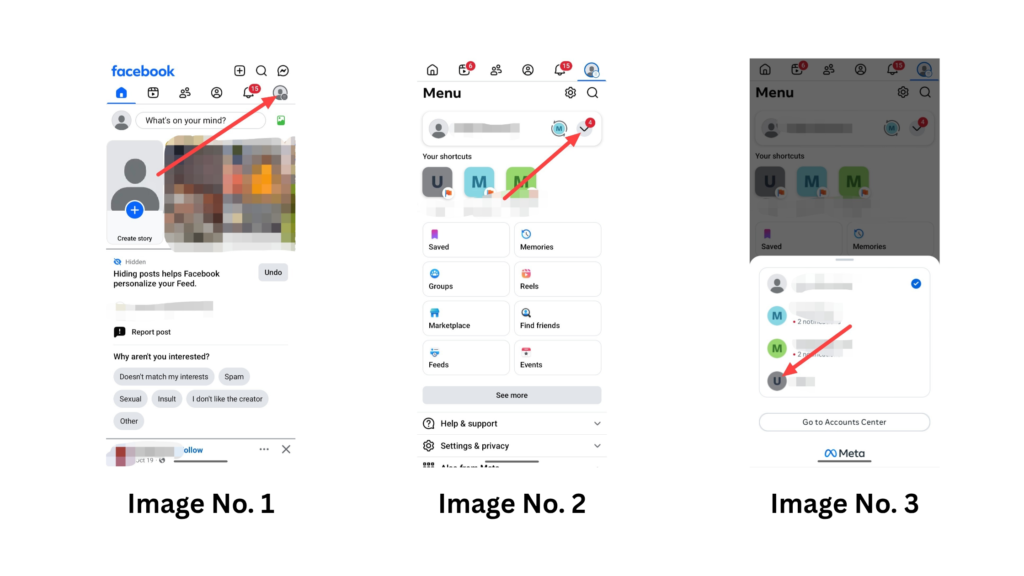
When you choose page, you can see you switch on your page after some loading and click again on these three lines.
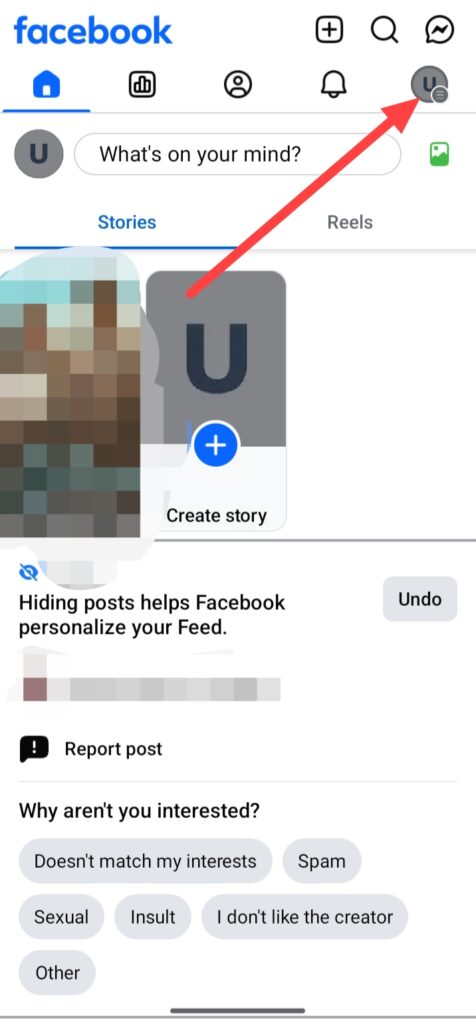
And click on the page.
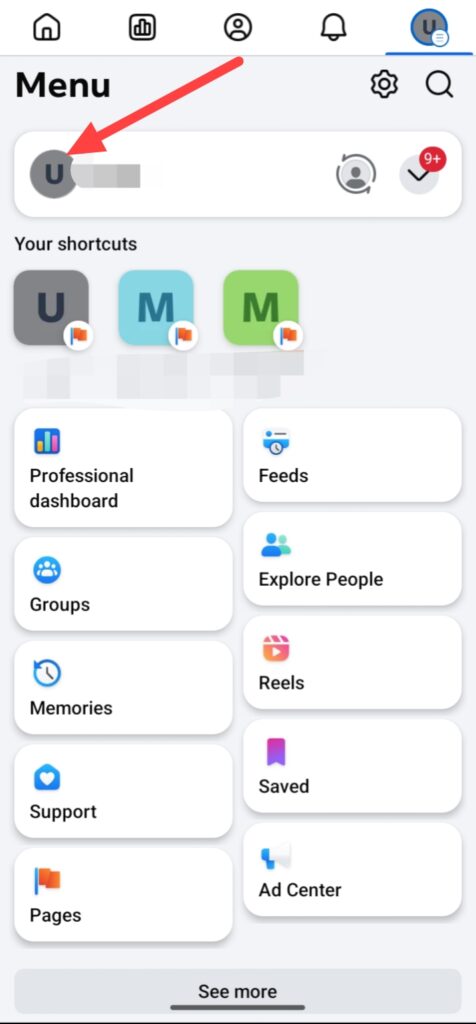
Then click on these three points.
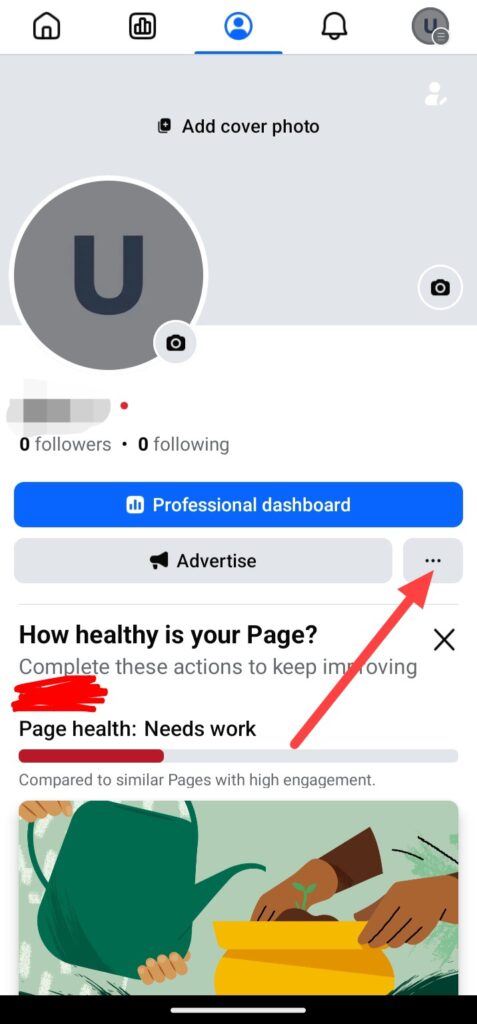
Click on Settings & privacy.
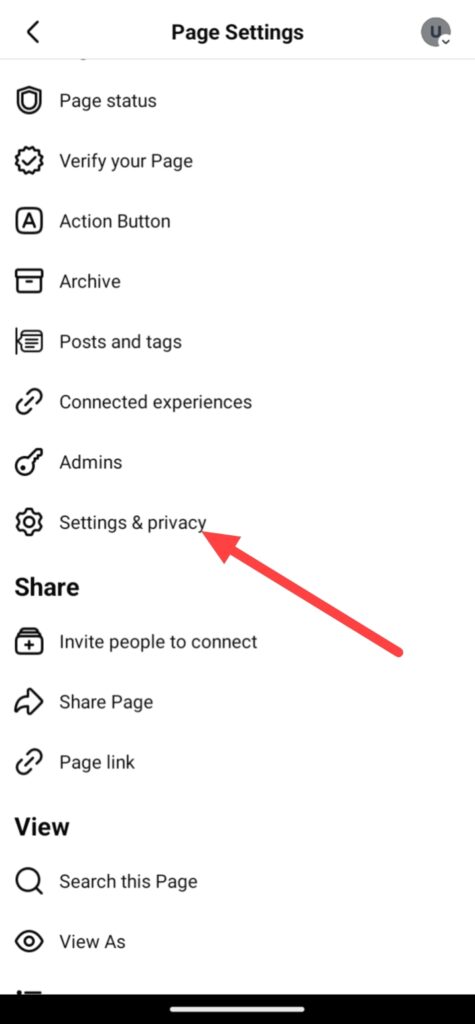
Do some scrolling and you can see a option of Access and control, simply click on this.
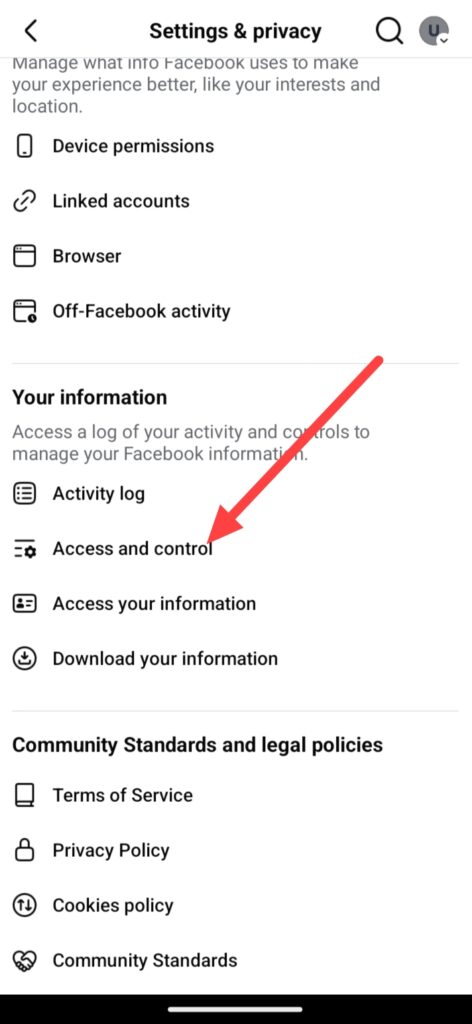
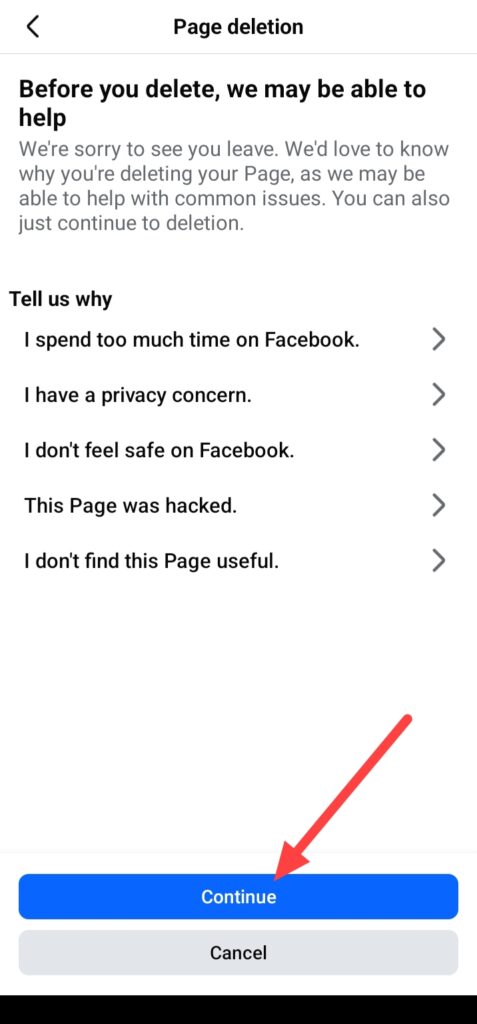
Then you can see these two options, click on the last option thats is Delete Page and click on Continue.

When you click on Continue, you can see this interface, thats means before you delete your Facebook page you can select and send a reason to Facebook, why you wanna delete your Facebook page, but by the way you can do continue this process without doing this.
And you can see these two options about your page data, if you wanna download your data you can click on Download info and if you wanna save your facebook page photos or posts click on Go to activity log, if you don’t wanna this, simply click on Continue.
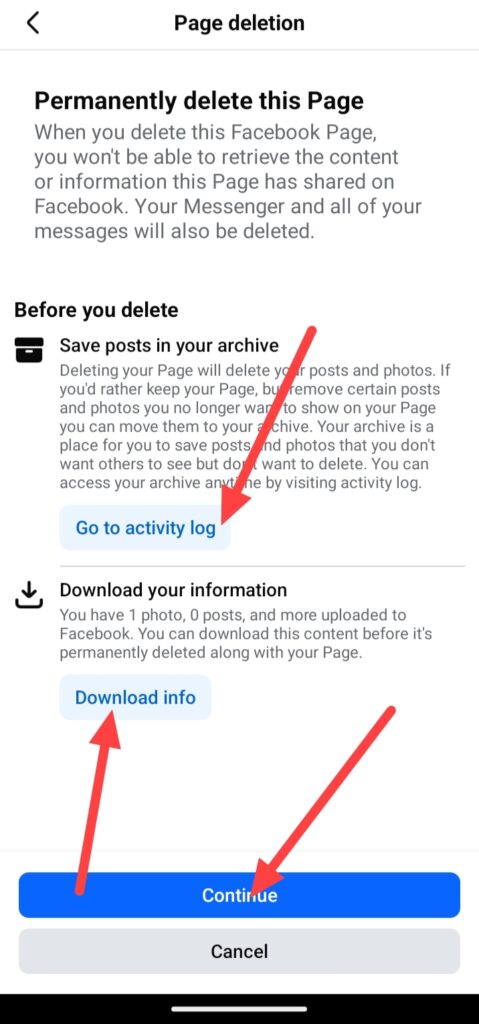
If you wanna delete you Facebook page, you need to enter your facebook account password which account is attached from your facebook page and click on Continue.
And click on Delete Page.
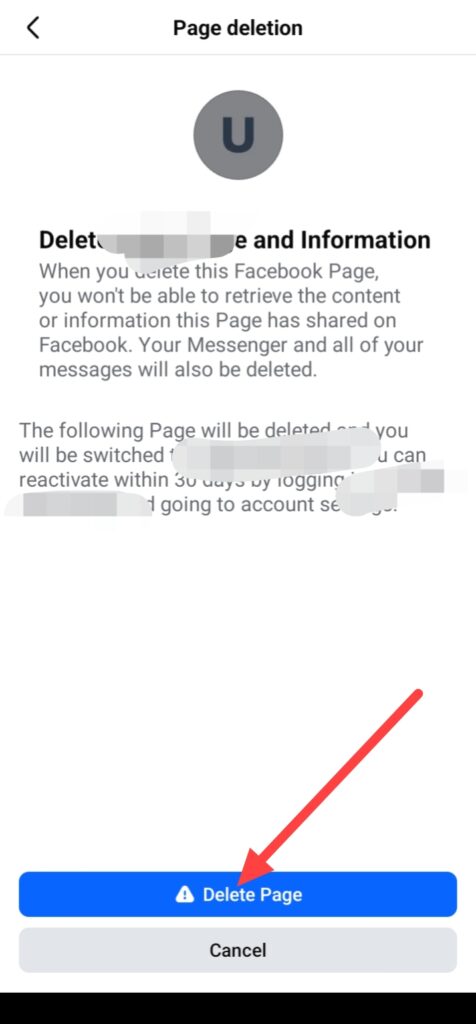
Finally, your Facebook page is deleted.
How to Delete Facebook Page from Web –
If you wanna delete your Facebook page from help of your laptop or computer, first open any web browser like Chrome, Firefox, Edge or any other browser and login your facebook account.
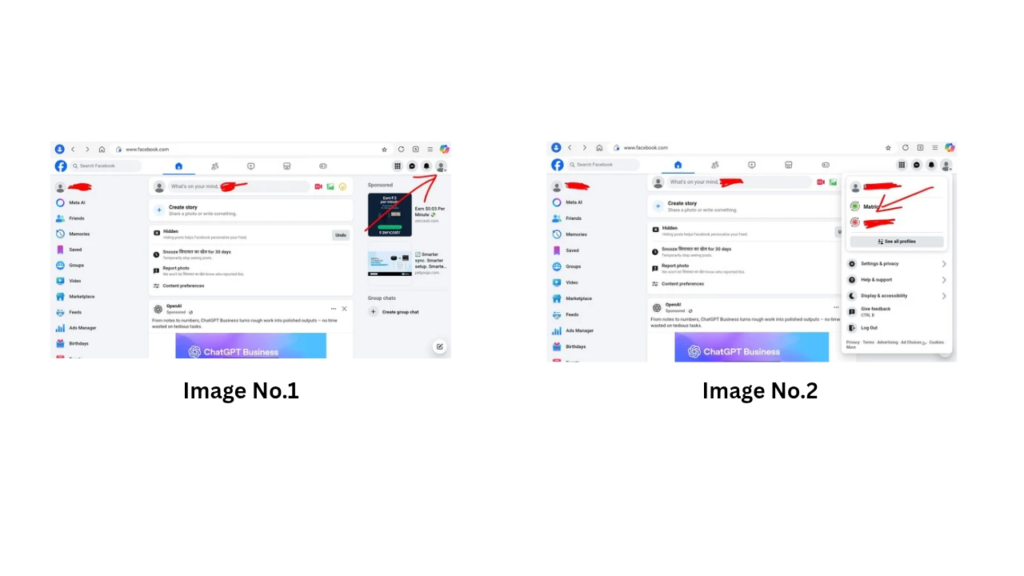
When you login your facebook account you can see this type of interface, then click on your profile.
And select your page who you wanna delete.
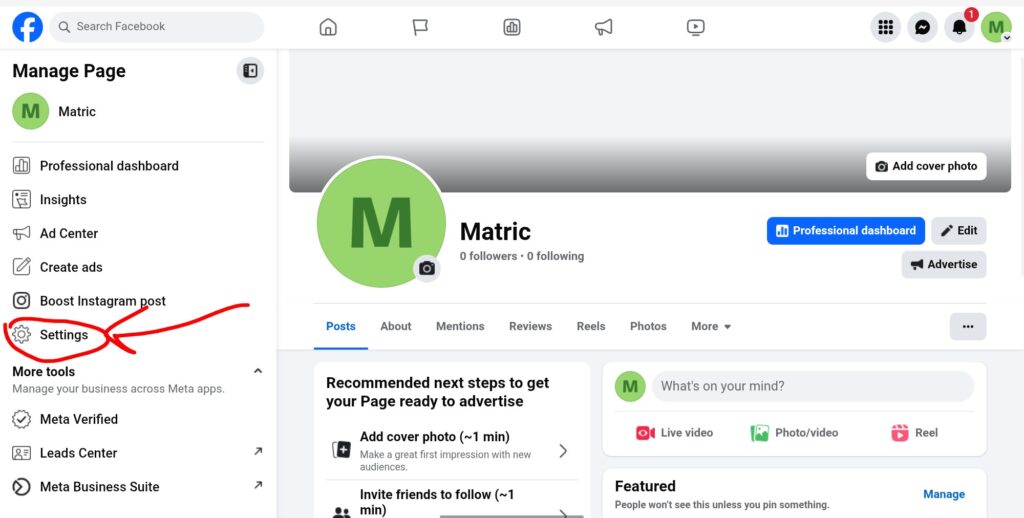
When you select your Facebook page you see this interface after some loading, and click on your page profile or name.
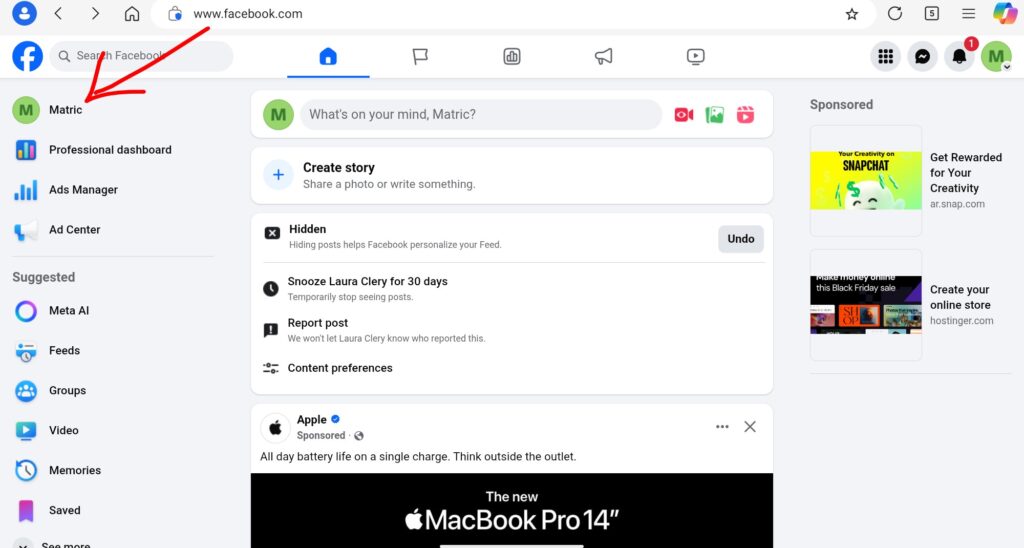
And click on Settings.
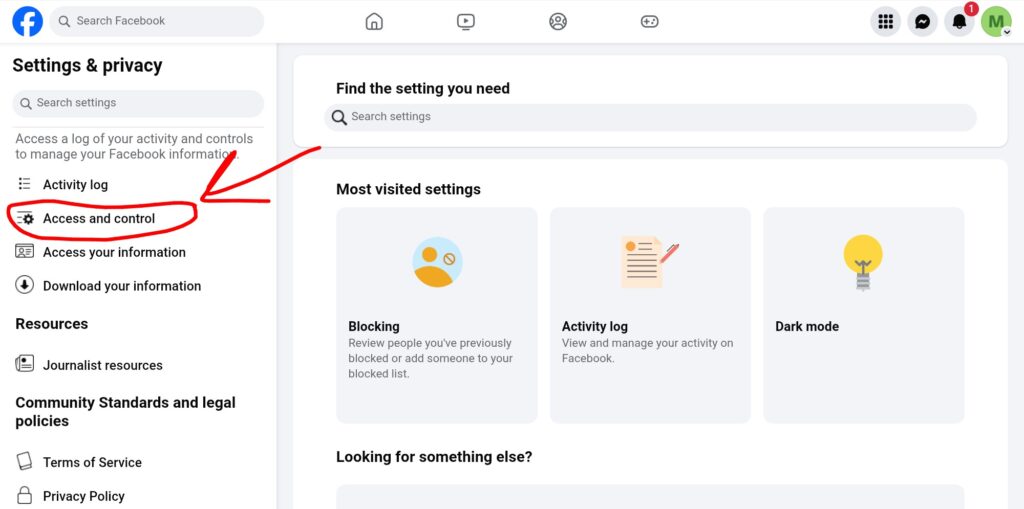
Then you can see a option of Access and Control after some scrolling, simply click on this.
After these steps you can see these three options, simply click on the last option thats it Delete Page and click on Continue.

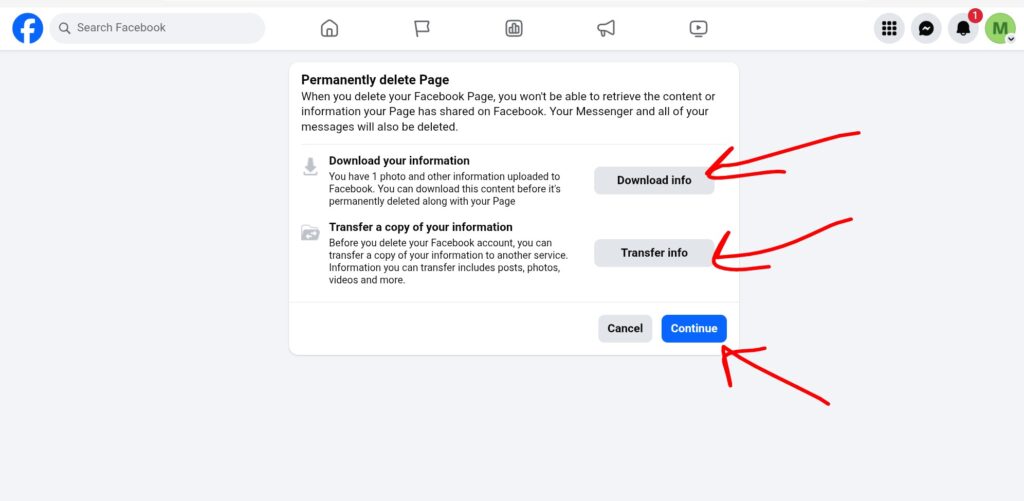
When you click on Continue, you can see these two options about your page data, if you wanna download your data you can click on Download info and if you wanna transfer your data click on Transfer info, if you don’t wanna this, simply click on Continue.
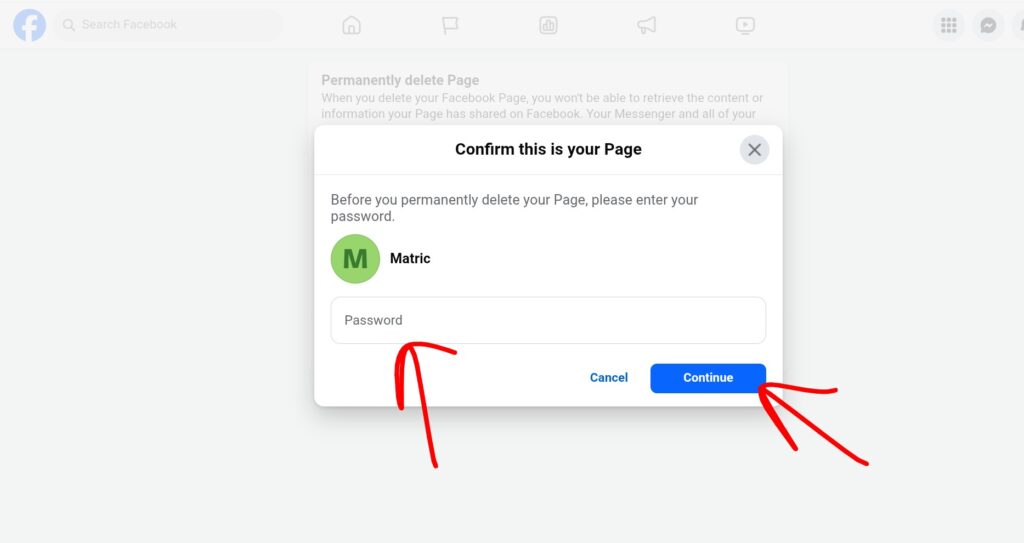
If you wanna delete you Facebook page, you need to enter your facebook account password which account is attached from your facebook page and click on Continue.
And click on Delete Page.
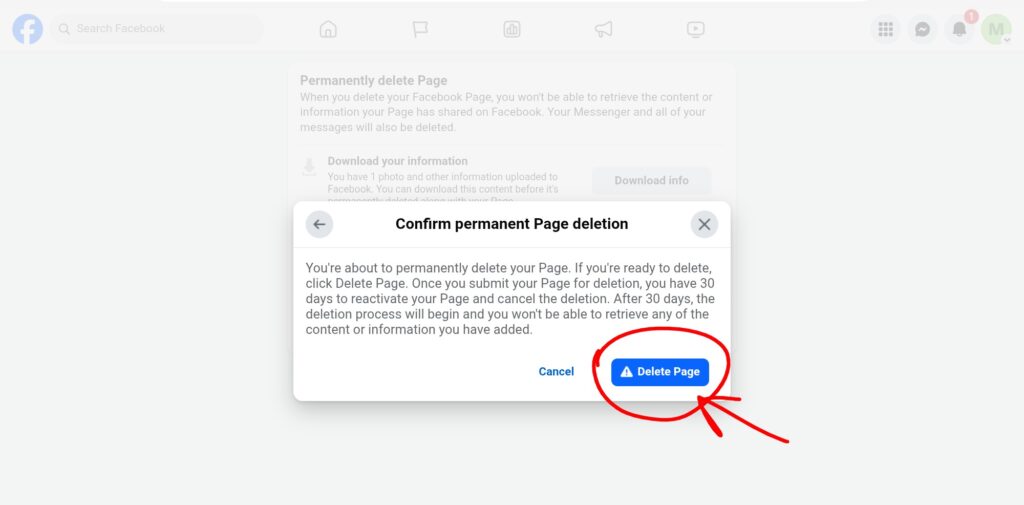
Finally, your facebook page is deleted.
FAQ –
Question; How do I permanently delete my Facebook page?
Answer; If you wanna delete your Facebook page permanently, you can see this step-by-step guide, in this guide i will show you both ways of deleting a Facebook page mobile and web.
Question; Can you delete a Facebook page without deleting your personal account?
Answer; Yes, you can easily delete your Facebook page without deleting your Facebook account, you don’t need to delete your Facebook account for delete Facebook page.
Question; Which is better, a Facebook profile or page?
Answer; If you wanna grow your business, organization, personal or you need global audience for your content Facebook page is the best for you, but if you don’t motive of these things you can use Facebook profile because Facebook profile is the best for your personal use.
Question; Is creating a page on Facebook free?
Answer; Yes, creating Facebook page is completely free and simple, you can do this work easily after reading this article.
Question; Does deactivating FB delete pages?
Answer; No, when you deactivate your Facebook account it doesn’t mean your Facebook page has been deleted or Facebook automatically deleted your page, because when you deactivate Facebook account your Facebook page will hide from public like it is not show of your friends or audience, deactivating Facebook thats not delete Facebook page.
Question; Can I recover my deleted Facebook page.
Answer; Yes, but after 30 days you can’t able to recover your facebook page, if you wanna recover your facebook page you need to take action before 30 days, otherwise you lose your page.
Conclusion –
This is the step-by-step process of how to delete Facebook page from help of your smartphone and computer with both devices, i hope you easily understand the all process of delete Facebook page.
In this article i not only shared you how you can delete your Facebook page even I show you some reasons why you wanna delete your Facebook page and what happen when you delete your Facebook page.
If you wanna have any questions about this blog post or this website you can ask me in our comments section or you can ask from our contact form.