
Snapchat is a one of the most popular social media platform but it is very different from other popular social media platforms, that allows you to share your your photo and videos or important talks to your friends and family members.
No doubt it is a useful social media platform, everything has pros and cons, so you need to decide to take a break for sometime from social media or snapchat, if your answer is yes, you come to the right place.
If you use any social media platform too much for entertaining and scrolling this is a bad habit, it can burn your life and time both, your decision is the right to take a break for sometime to social media and Snapchat, if you use it too much.
You need to break on social media for sometime, it is one of the simple and popular method is deactivate or delete your social media account, but in this post i will share with you only how to delete snapchat account, but not just a only reason of deleting your snapchat account is distracted, it is different-different types of reasons can available according to person needs.
Why You Wanna Delete Your Snapchat Account –
Why do you delete your snapchat account thats have lot of reasons for different person because every person have different reasons like maybe, that is be privacy concern for some persons, you doing avoid online negativity or toxicity, if snapchat is affecting your mental health or productivity, deleting your account can provide relief and any other reasons are available.
Maybe these are all reasons cannot be suitable for all peoples because everyone have different reasons or maybe they have other big reasons to delete snapchat account from these reasons but if any person want to delete their snapchat account, maybe they are not wanna use this service for long time.
What Happen After You Delete Your Snapchat Account –
When you delete your Snapchat account, it first enters a deactivation period of 30 days or 180 days if you’re in India, after deleting your snapchat account your account is hidden from friends your username won’t appear in chats, stories, or searches, and no one do can contact you however, if you log back in within this deactivation window, you can reactivate your account and regain access to your friends, Messages, Memories, and Snap Streaks.
After this deadline your snapchat account is permanently deleted and also all associated data such as snaps, chats, friends list, Memories, Bitmoji, and Snap Score are erased but if you wanna need your snapchat account data you can get backup of your snapchat account.
How to Delete Snapchat Account from Phone –
If you wanna delete your Snapchat account from help of your smartphone device follow these simple steps –
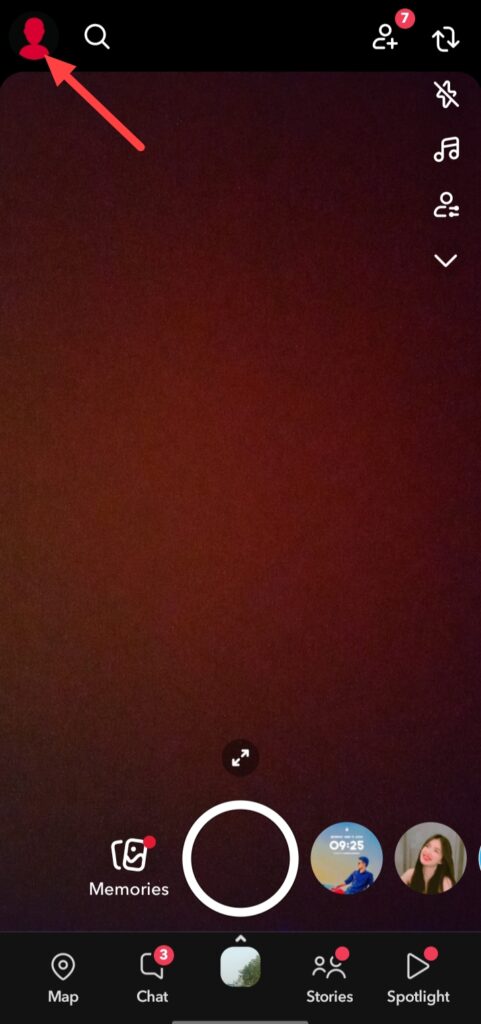
If you wanna delete your Snapchat account from your phone, first open your snapchat app and click on the profile icon.
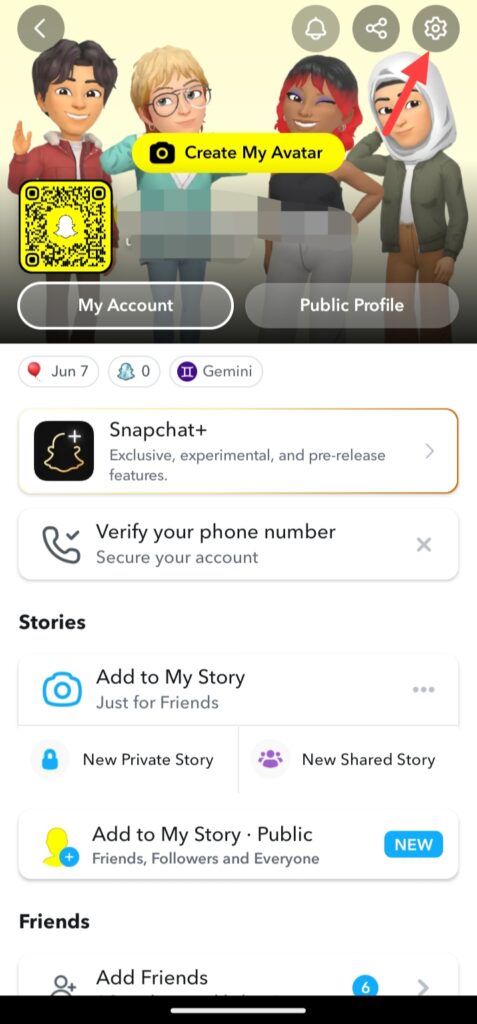
And click on this settings icon.
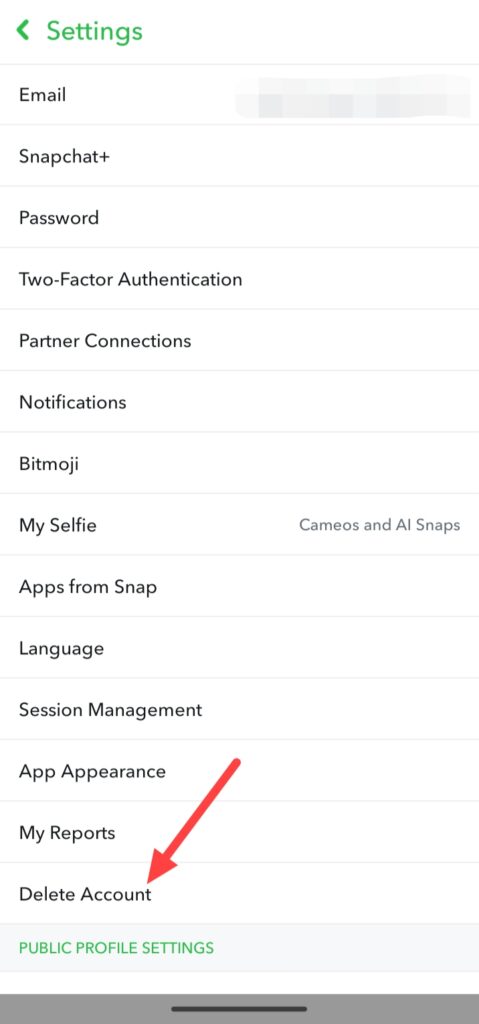
After clicking on Settings icon you can see Delete Account option after some scrolling in My Accounts, click on this Delete Account option when you click on this option you can see you automatically go in web.
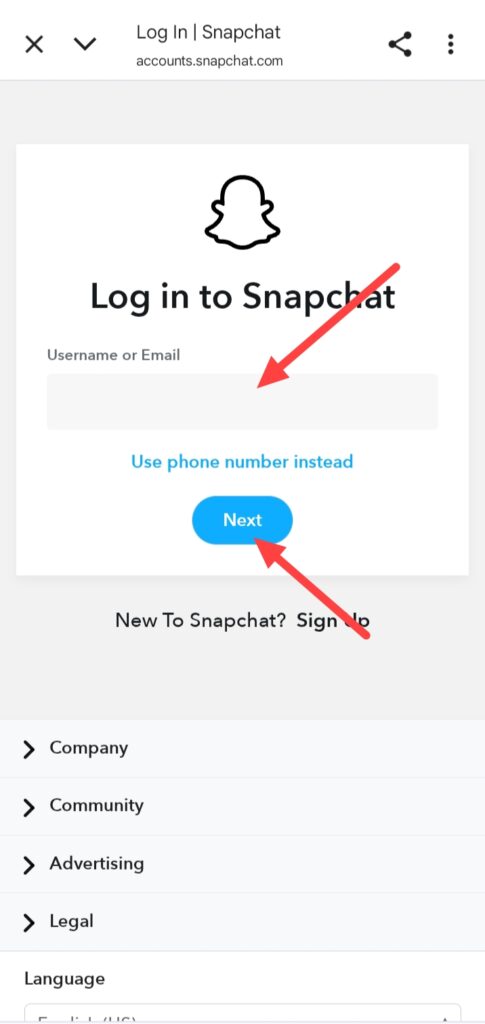
After going in web, you can this type of interface, enter your Username or Email then click on the Next icon but you can also use your phone number if you already attached your phone number to your snapchat account, simply you need to click on Use phone number instead, if you wanna do with phone number.
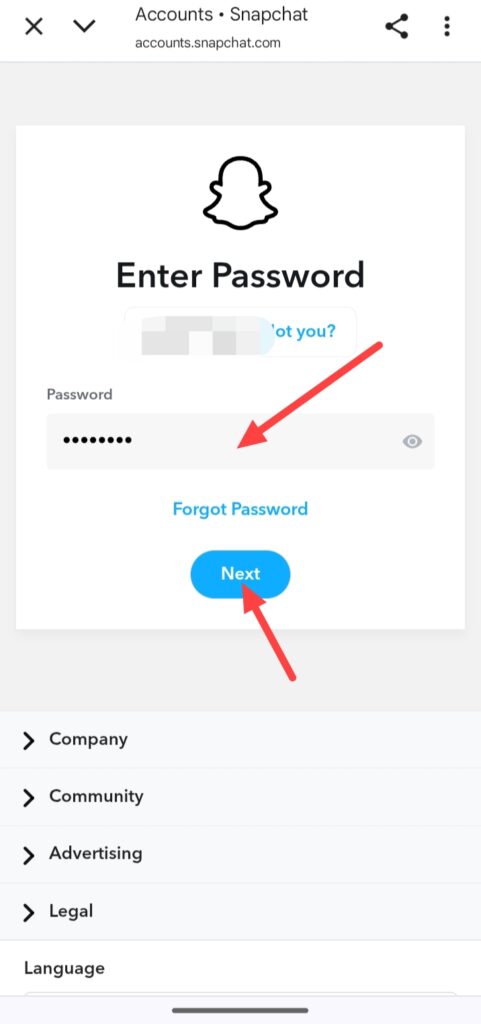
And enter your snapchat account password and click on the Next icon, if you don’t know your password you can do Forgot Password.
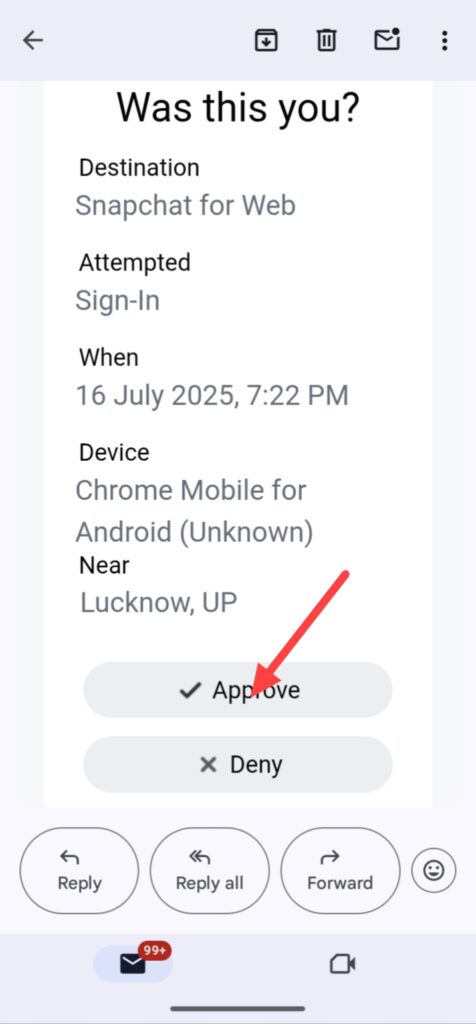
After entering password you get a mail on your gamil account which email you use in snapchat account, you get this email, simply click on Approve, but don’t delete from minimize your snapchat app.
After do Approve from you email, go to the your snapchat app again you can see this interface, enter your account password your snapchat username already entered by snapchat and click on the Countinue.
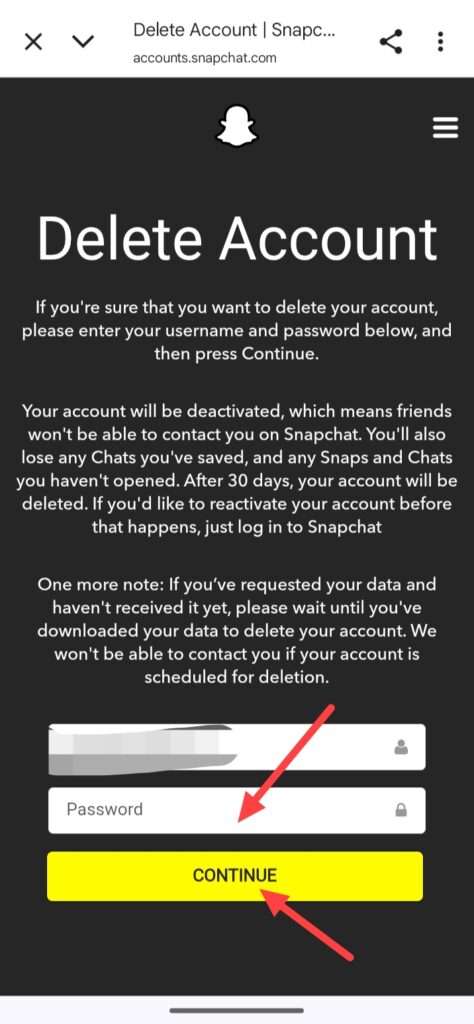
And finally your account has been deactivated not deleted because in 30 days, your snapchat account will be deleted if you don’t reactivate this account, after 30 days your snapchat account is automatically deleted and you can’t reactivate again.
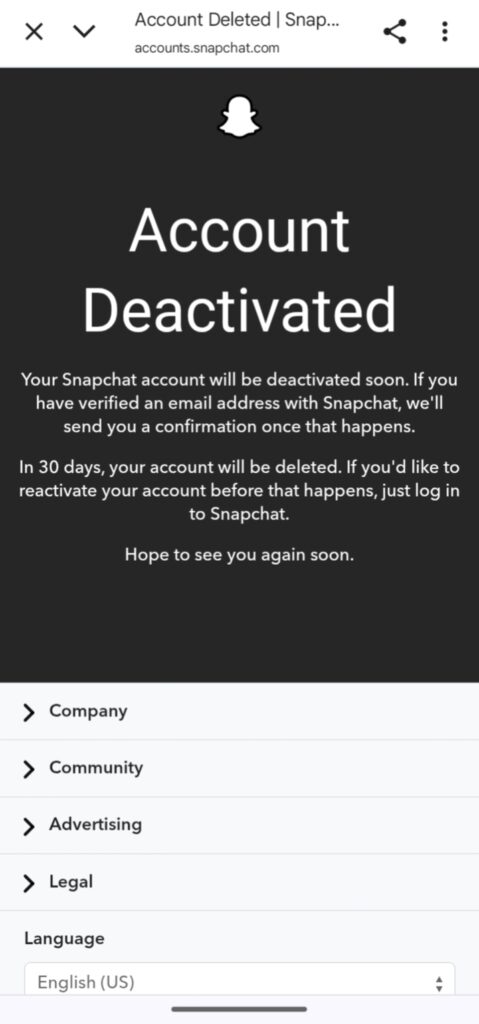
So, this was the full step-by-step guide of how to delete Snapchat account from help of your smartphone device.
How to Delete Snapchat Account from Web –
If you wanna delete your Snapchat account from your computer or laptop follow this step-by-step guide of how to delete most popular social media app Snapchat account from web –
If you wanna delete your Snapchat account from web, first open a any web browser and go to the https://www.snapchat.com/ and login your snapchat account then go to the profile section.
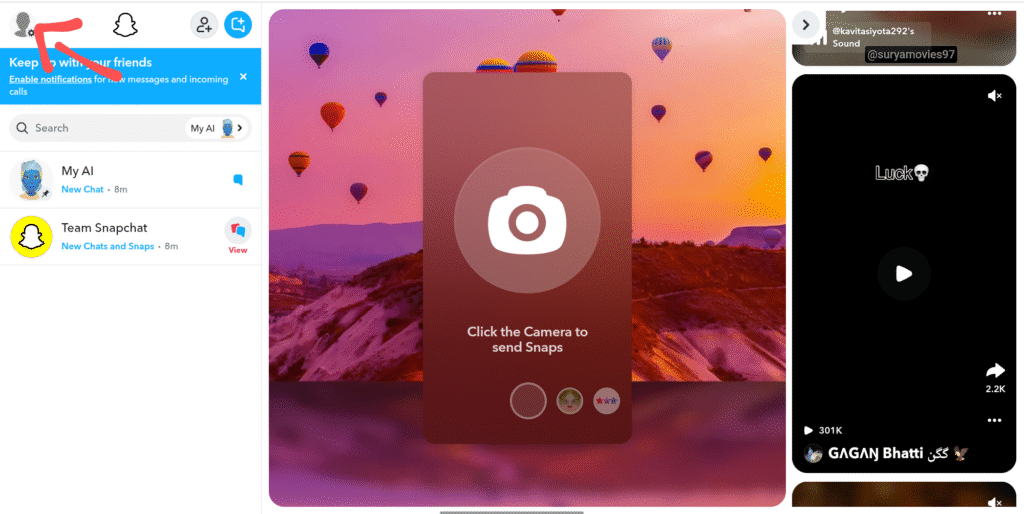
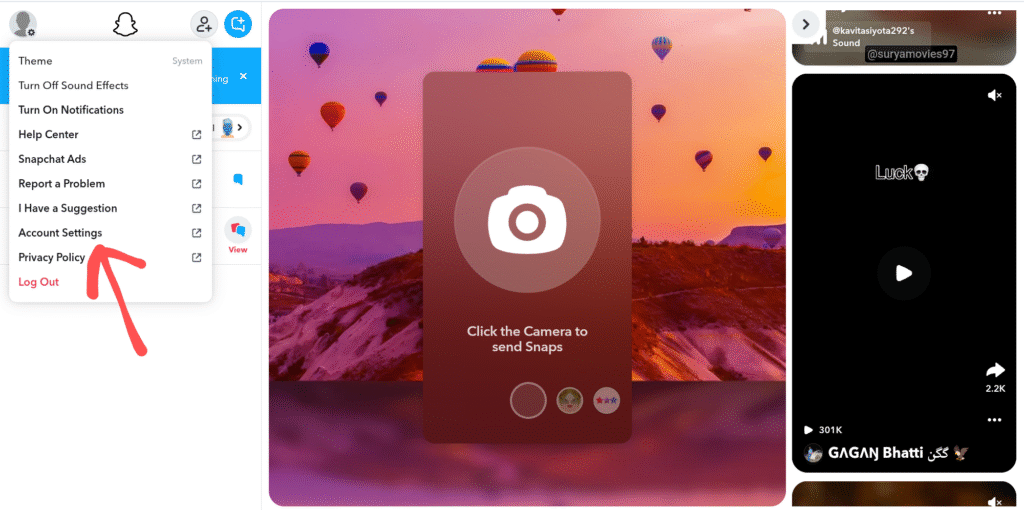
And go to the Account Settings.
You can see this interface, click on the Delete my Account.
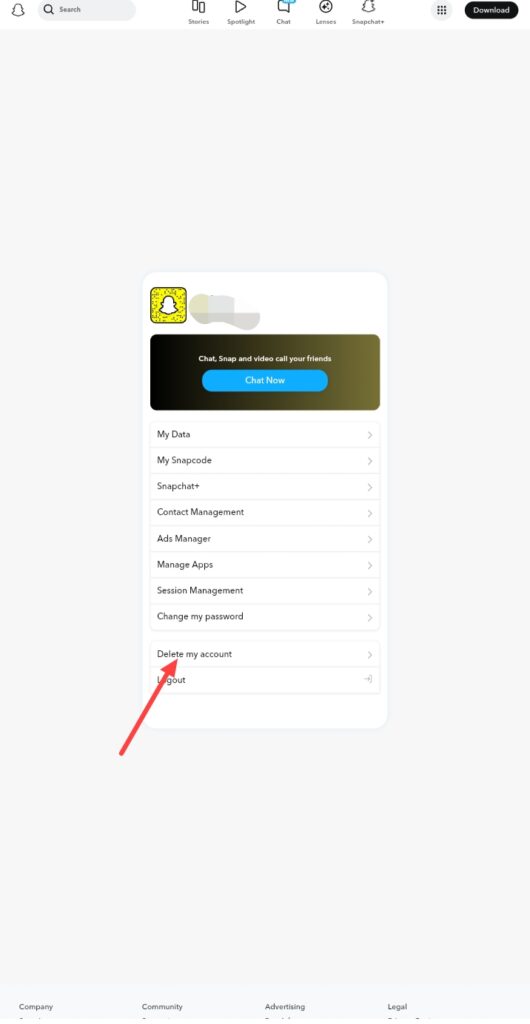
After this process you can follow steps from how to delete snapchat account from phone guide.
And enter your password your snapchat username already entered then click on countinue, after entering password your account has been deactivated not deleted because in 30 days, your snapchat account will be deleted if you don’t reactivate this account, after 30 days your snapchat account is automatically deleted and you can’t reactivate again.
So, this was the full step-by-step guide of how to delete Snapchat account from your computer or laptop with using any web browser like Google Chrome, Microsoft, Firefox or any other browser.
FAQ –
Question; Can Snapchat be temporarily disabled?
Answer; Yes, you can do this work easily from help of this article but reactivate your Snapchat account before 30 days because after 30 days your Snapchat account is permanently deleted.
Question; Is deactivating your Snapchat the same as deleting it?
Answer; No, it is the not both same because when you deactivate your Snapchat account it isn’t delete, the deactivation helps you can do temporary disabled for 30 days your account not permanent deleted, but When you delete your Snapchat account you delete your account permanently with your all data like snaps, messages, photos, videos and other things, you cannot recover your account after deleting.
Question; How to take a break from Snapchat without deleting an account?
Answer; If you wanna take break from Snapchat, you can do deactivate your Snapchat account because deactivation is the one of the most popular and useful features you can take break without losing your any data, but reactivate your Snapchat account before deadline.
Question; Can you get a permanently deleted Snapchat account?
Answer; No, you can’t get your permanent deleted Snapchat account because Snapchat already says reactivate your account before deadline because after 30 days your account cannot reactivate.
Conclusion –
In this article i will tech you how you can delete your Snapchat account from help of your smartphone and from help of your computer or laptop devices, these both ways are available, i hope you easily understand how you can delete your Snapchat account, if you’ve any question about this article or our website you can ask in comment section.