
Snapchat is one of the most popular messaging and multimedia apps, especially among younger users, thanks to its unique approach to communication, where photos, videos, and chats are designed to disappear after being viewed.
However, even with its self-destructing nature, many users often find themselves wanting more control over their conversations whether it’s to correct a mistake, clear out cluttered chats, or simply protect your privacy, knowing how to delete Snapchat messages manually is an essential skill for every user.
In this guide, i will guide you step-by-step process of how to delete Snapchat messages with your phone and web both way, thats helps you can take full control of your conversation without any regret or other problems.
How to Delete Snapchat Messages from Phone –
If you wanna delete your Snapchat messages from help of your smartphone device follow these simple steps –
If you wanna delete your Snapchat message from your phone, first open Snapchat app and go to the chats section then select a person whom chat you wanna delete.
Simply click on their message and hold this message from your fingertip you can see a popup, in this popup you can see a option that is called Delete button, click on this Delete button, after this you can see a more popup simply click on Delete Chat button.
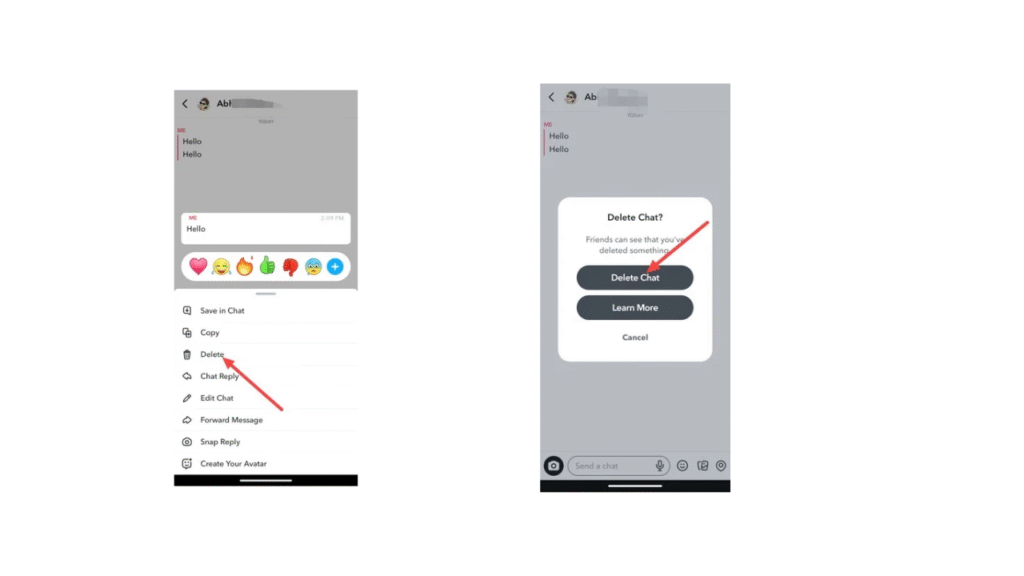
After doing this finally your message has been deleted.
So, this was the step-by-step guide for how to elete Snapchat messages from help of your smartphone device.
How to Delete Snapchat Messages from Web –
If you wanna delete your Snapchat messages from help of your computer or laptop devices follow this step-by-step guide of how to delete Snapchat messages from web –
If you wanna delete your Snapchat message from web, first open a any web browser and go to the snapchat and login your Snapchat account then open the chat whom you wanna do delete.
And click on the message and you can see this popup, in this popup available a delete button, click this button.
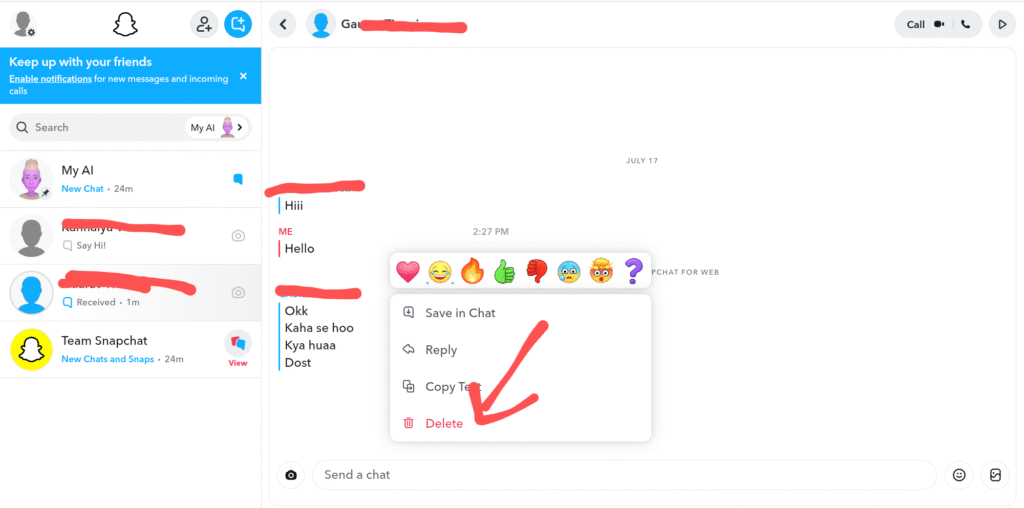
When you click on this Delete button, finally your chat has been deleted.
So, this was the full step-by-step guide of how to delete Snapchat messages from your computer or laptop with using any web browser like Google Chrome, Microsoft, Firefox or any other browser.
FAQ –
Question; Is there a way to delete a Snapchat message?
Answer; Yes, you can delete your Snapchat message, simply press and hold a message which you wanna delete then you can see a delete button simply tap on this button, your Snapchat message is deleted, but if you need clear guidence you can get from this article.
Question; Does Snapchat have a deleted history?
Answer; No, you can’t recover your deleted data or memory because Snapchat can’t support restore feature because Snapchat Says – We respect Snapchatters’ privacy, so when a Snap is deleted from your Memories, our servers erase that Snap as soon as possible. This is why we cannot recover lost or deleted Memories.
Question; Does clear conversation Delete both sides?
Answer; No, when you delete your Snapchat message or when you do clear your conversation from your Snapchat account, it doesn’t mean the same chat or conversation is removed from other persons Snapchat account or device, it is removed only from your device.
Question; How long does Snapchat keep data?
Answer; Snapchat keep your data is only for 30 days because after 30 days your all data is deleted for permanent then you can’t recover your data, but maximum of social media apps keep your data only for 30 days.
Question; What does green dot mean on Snapchat?
Answer; The green dot mean on Snapchat is not the showing a person online presence because some peoples think this, the green dot is a privacy feature thats helps you can see a persons camera or microphone is in currently use.
Conclusion –
In this article all process i provided all information of you how you can delete your Snapchat messages from help of your phone and computer or laptop with both ways, i hope you easily understand how you can delete your Snapchat messages or mistakes, if you’ve any question about this article or our website you can ask in comment section.