
Twitter (X) is a popular social media platform but it is very different from other popular social media platforms, that allows you to share your problems or important talks to company, person, organization, etc.
No doubt it is a useful social media platform, everything has pros and cons, so you need to decide to take a break for sometime from social media or twitter, if your answer is yes, you come to the right place.
If you use any social media platform too much for entertaining and scrolling this is a bad habit, it can burn your life and time both, your decision is the right to take a break for sometime to social media and twitter, if you use it too much.
You need to break on social media for sometime, it is one of the simple and popular method is deactivate or delete your social media account, but in this post i will share with you only how to Delete Twitter account.
But not just a only reason of deleting your twitter account is distracted, it is different-different types of reasons can available according to person needs.
Reasons Why You Want To Delete Your Twitter Account –
Why do you delete your Twitter or X account thats have lot of reasons for different person because every person have different reasons like maybe that is be privacy concern for some persons, you doing avoid online negativity or toxicity, if Twitter is affecting your mental health or productivity, deleting your account can provide relief and any other reasons are available.
Maybe these are all reasons cannot be suitable for all peoples because everyone have different reasons or maybe they have other big reasons to delete X account from these reasons but if any person want to delete their X account, maybe they are not wanna use this service for long time.
How to Delete Twitter Account from Phone –
If you wanna delete your Twitter or X account follow these steps –
Step 1 – First, Open Twitter (X) app in your mobile phone, if you’ve not twitter or X account or you’re logout from twitter or X, you’ve option to create new account or loging your existing Twitter (X) account.

Step 2 – Click on the Settings & Support and you can see settings and privacy option click on this.
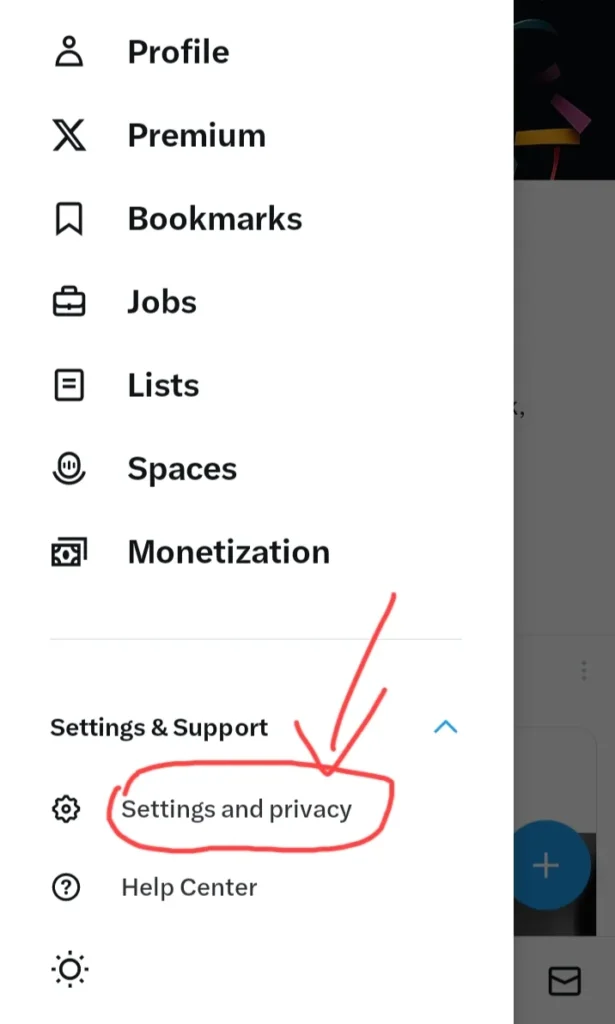
Step 3 – After doing these you can see this type of interface and simply click on Your Account.

Step 4 – And click on Deactivate Account.

Step 5 – After click on Deactivate Account you can see a page thats have a red colour button of Deactivate Account in bottom simply click on this and you can see this type of interface simply enter your account password and click on Deactivate Account.
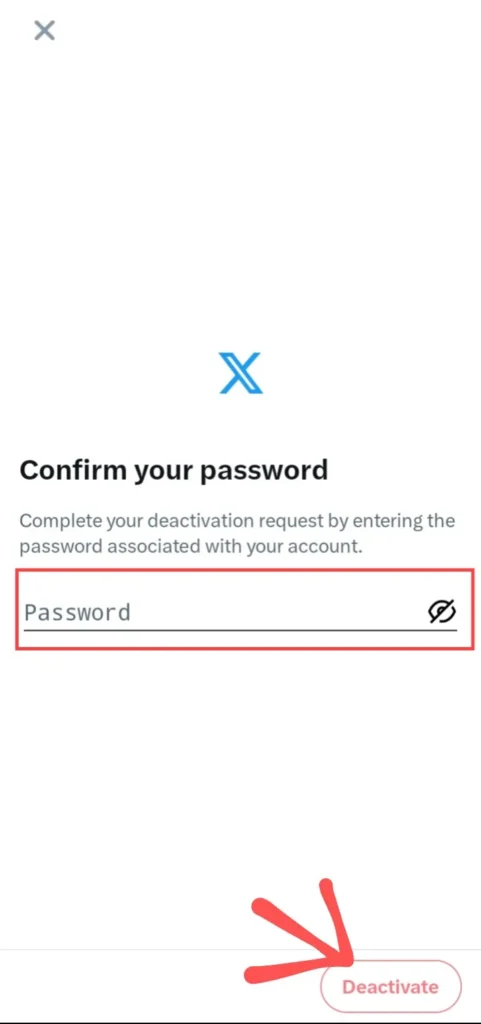
Finally, your Twitter or X account is deactivated, but if you wanna delete your X account please do not reactive this account because after 30 days of deactivation it is automatically deleted.
How to Delete Twitter Account in Web –
If you wanna delete your Twitter or X account from your computer or laptop follow this step-by-step guide of how to delete your Twitter or X account from web –
Step 1 – First, Open any web browser in your device like Google Chrome, Microsoft Edge, Firefox or any other browser and search on the Google Twitter or X Login and click on this link https://twitter.com and login your Twitter (X) account, after login in twitter or X account, you can see this type of interface like this image.
And click on the your account Profile, you can see in this image.
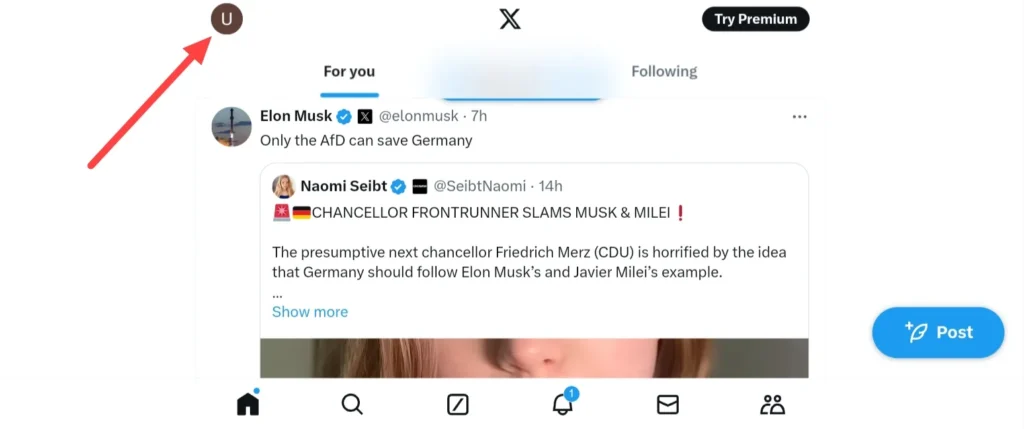
Step 2 – Then click on the more and go to the settings and privacy and after this click on Your Account option.

Step 3 – After clicking on Your Account you can see this type of interface simply click on Deactivate Your Account.
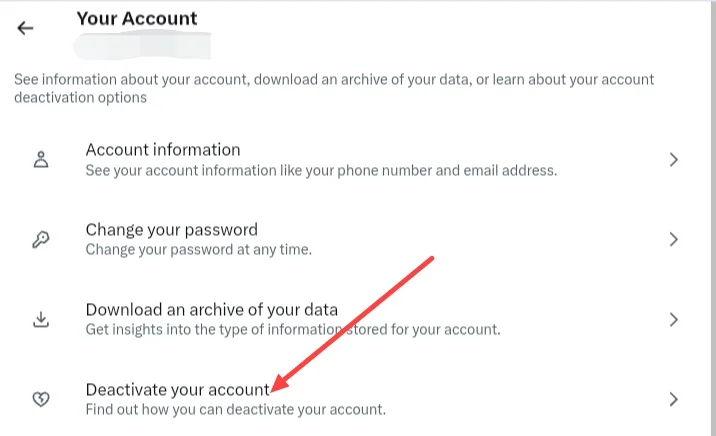
Step 4 – After click on Deactivate Account you can see a page thats have a red colour button of Deactivate Account in bottom simply click on this and you can see this type of interface simply enter your account password and click on Deactivate Account.
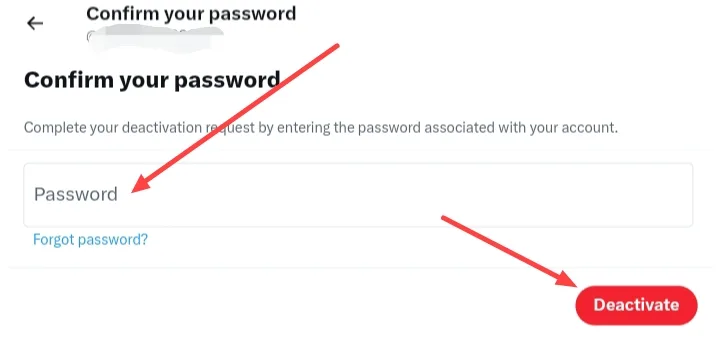
Finally, your Twitter or X account is deactivated, but if you wanna delete your X account please do not reactive this account after 30 days of deactivation it is automatically deleted.
So, this was the full step-by-step guide of how to delete your Twitter or X account from your computer or laptop with using any web browser like Google Chrome, Microsoft, Firefox or any other browser.
I hope you clearly and easy understand of these both guides of deleting your Twitter or X account, by the way, Twitter name is already changed in present time thats called X platform, but at this time after changing name also some persons calling this Twitter even also when Elon musk alredy changed this platform name and thats call platform X.
FAQ –
Question; Is deactivating the same as deleting?
Answer; No, it is not the same because when you deactivate your account it is remove from search and not anyone can see your account until you can’t reactive your account, it is just for temporary but if you delete your account that means your account all data and prescense has been permanently deleted like your photos, videos, comments, likes or any other things.
Question; How do you delete your Twitter or X account permanently?
Answer; If you wanna delete your Twitter or X account permanently, login your Twitter or X account go to Settings and click on the Privacy the click Your account and click on the Deactivate your account, confirm your password, and tap Deactivate, your X account is deactivated but at this time it is not deleted for permanent because if you don’t login your Twitter or X account, it will be automatically permanently deleted after 30 days.
Question; How long can you deactivate Twitter or X?
Answer; The number of long log you can deactivate your Twitter or X account that is 30 days because after this time period when you don’t reactivate your Twitter or X account, it will be permanently deleted.
Question; Can anyone see a deactivated account?
Answer; No, You can’t see a deactivated Twitter or X account and also you can’t see a deleted twitter or X account.
Conclusion –
In this all process I have share with you how to delete your X account, it is the proper guide of deleting X account from phone and web, if you have any question about this article or you have any question about our website you can ask in comment box or you can contact from our contact form.