
Getting backup on WhatsApp or any other app or social media platforms is one of the best and safe way to protect your data or protect your hard work because backup helps you can take data in a file like Google Drive or other platforms, after this when you lose your account but your data is be safe in a file.
By the way, in this internet world WhatsApp became a one of the best and safe way to communicate your friends and family members and send you can send them photos, videos, GIFs, documents, your location or you can create a WhatsApp group for making fun or your other work.
I know and everyone knows how WhatsApp is useful but sometime you lose your WhatsApp data because you lose your phone, you switch a new device or maybe accidentally deleted your WhatsApp data, when your WhatsApp data delete that means you all chats, photos, videos, groups and peoples who add on your WhatsApp you lose them.
So for saving your WhatsApp data from these situations you need to take backup of your WhatsApp, you can get daily, weekly and monthly backup from your WhatsApp account but if you don’t know how to get WhatsApp backup.
Don’t worry, because in this article I will share with you a step-by-step guide of how you can get backup easily from your WhatsApp account.
What is WhatsApp Backup –
WhatsApp backup is a best facitily that helps you safe your important WhatsApp data with taking any stress because when you take your WhatsApp data you don’t need to think about it because your WhatsApp data is save in a file in your device.
When you lose your device, damage your device, you switch in a new device or it can be possible accidentally your WhatsApp data is deleted, you can easily restore your deleted WhatsApp data from help of backup and you can the same data in a new WhatsApp account.
By the way, you don’t need to take any type of stress or you don’t think more about your WhatsApp data safety because you can take your WhatsApp data automatically and manually with both process.
And also you can take your WhatsApp data according to your needs like you can take daily, weekly and monthly data backup easily.
Why you Need to Get Your WhatsApp Backup –
- If you get backup from your WhatsApp account you can protect your important data like chats, photos, videos, documents, peoples who connected with you from WhatsApp and your WhatsApp groups.
- When you lose your WhatsApp account or your device, you can again use the same data in a new WhatsApp account, that means you can easily restore your data.
- Maybe you lose your device, damage your device, you switch in a new device or it can be possible accidentally your WhatsApp data is deleted.
So, these are some reasons why you need to get your WhatsApp backup, it is just for example maybe you have some other reasons because everyone have different reasons some big and some small.
Read Also – How to Create WhatsApp Account (2025)
Read Also – How to Create WhatsApp Group (2025)
Read Also – How to Create Poll on WhatsApp (2025)
How to Get WhatsApp Backup –
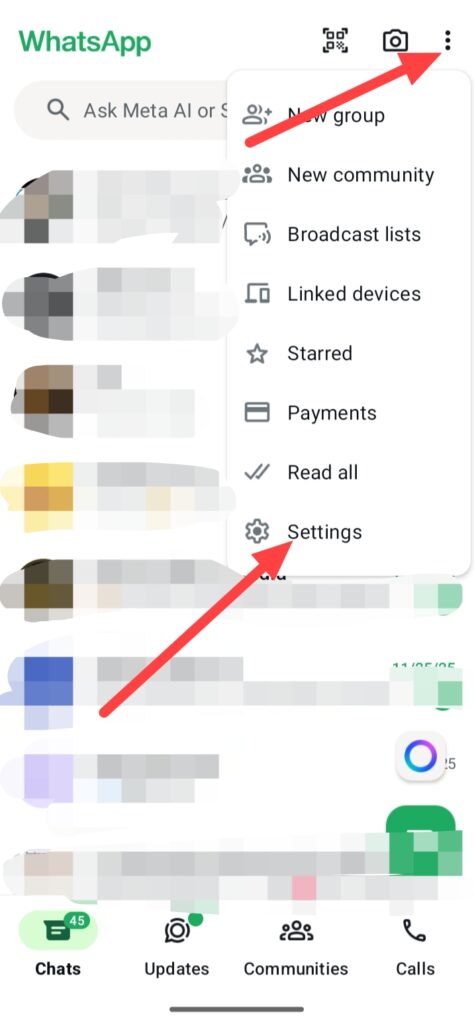
If you wanna get your WhatsApp backup, first open your WhatsApp app then click on these three points.
Then click on Settings.
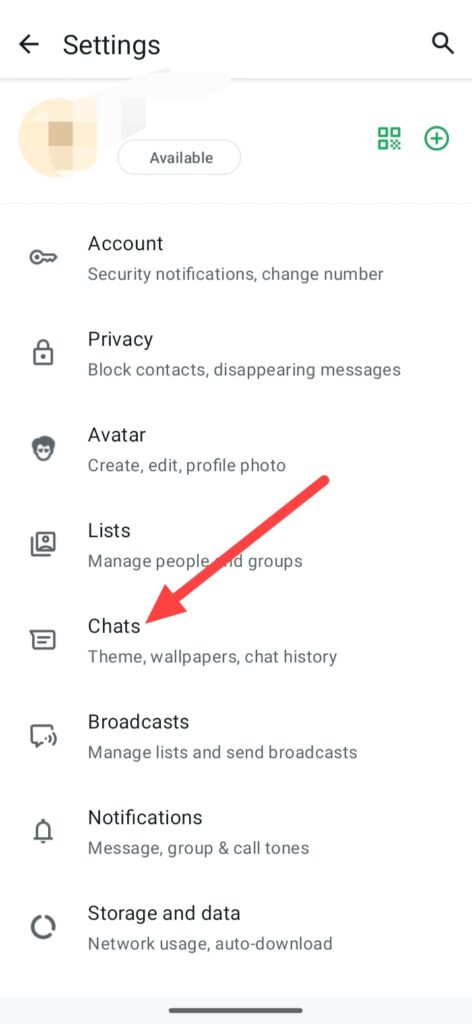
After this you can see this interface, click on Chats.
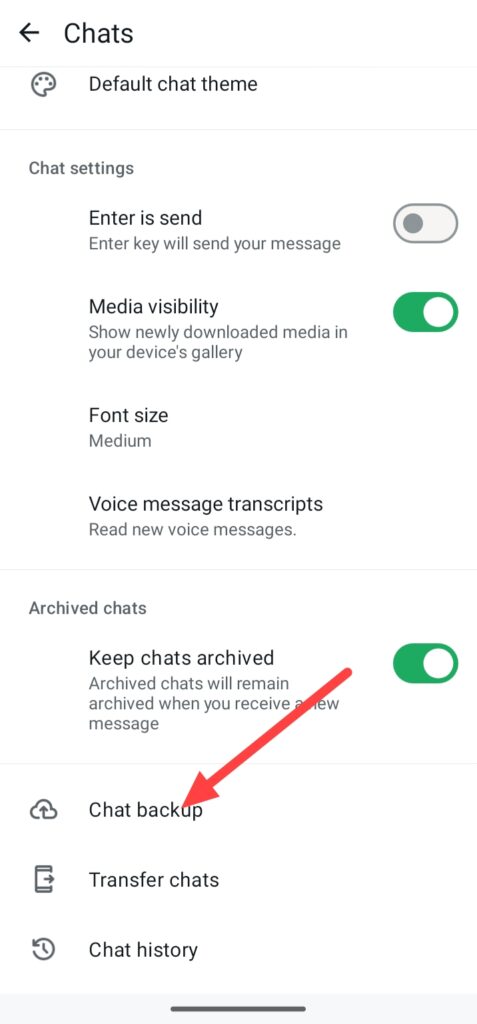
Then click on Chat backup, by the way, you can also transfer your all chats in your new phone or you can see your chat history.
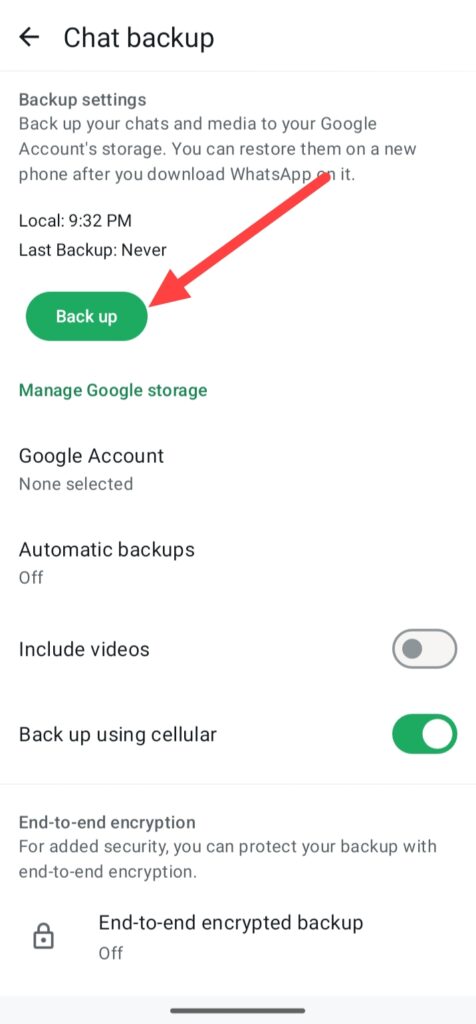
After these all you can see your WhatsApp backup options, you can also get your WhatsApp account backup in different types of ways like when you click on this green Back up button you can get your backup manually, even this is show your local time when you get your last time backup.
You can also include your videos, if you wanna your videos backup.
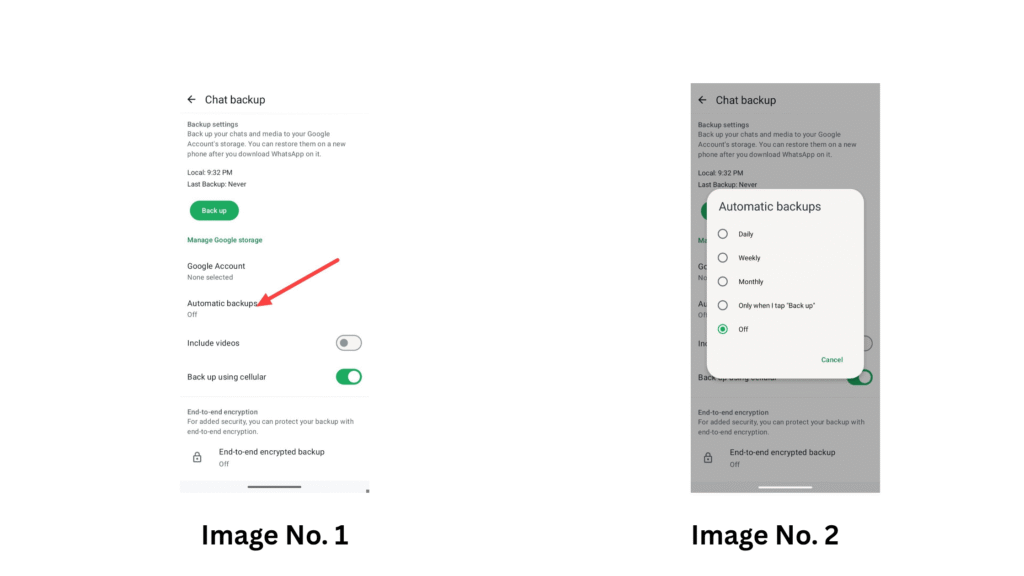
If you wanna automatically backup simply, click on the Automatic backups, When you click on automatic backups you can select your WhatsApp account backup time according to your need like you can select Daily, Weekly, Monthly or Only when I tap on “Back up”, it is completely depends on you.
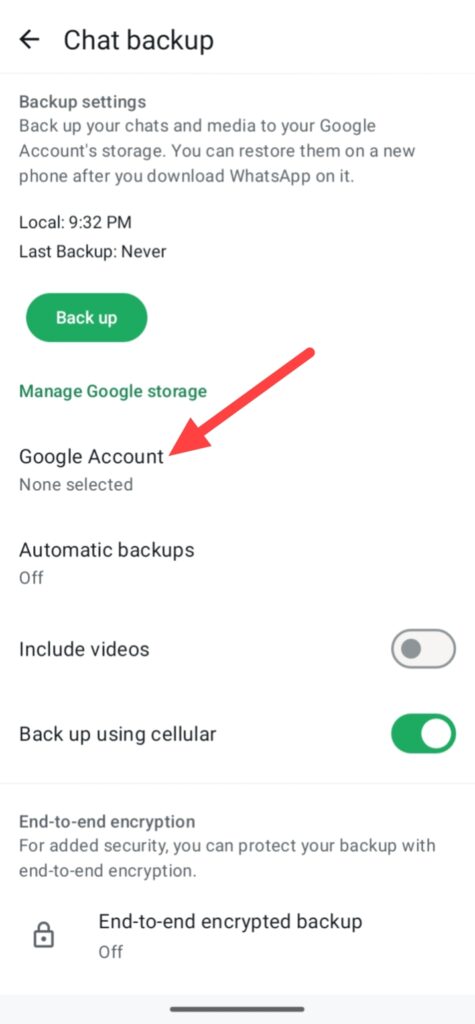
And you can select your Google Account, which Google Drive accounts you need your WhatsApp account storage backup.
Finally, you can get your WhatsApp account backup and make secure your personal data and privacy in your device even you can forget your account or you lose your WhatsApp.
FAQ –
Question; Where is my WhatsApp backup data stored?
Answer; If you get your WhatsApp account backup you can save your WhatsApp account backup in your phone device or SD card and you can use for keep your WhatsApp backup in your Google Drive but if you use iPhone you can also use your iPhone storage or iCloud service.
Question; Can I restore WhatsApp backup to a new phone?
Answer; Yes, you can easily restore you WhatsApp backup in your new smartphone WhatsApp and you can also use the same phone number and email in your WhatsApp account, which you used in your old smartphone.
And you can easily get your old WhatsApp backup in your new device by using your phone storage save WhatsApp file backup, your Google Drive or iCloud.
Question; Is WhatsApp backup automatic?
Answer; Yes you can also get your WhatsApp account backup automatically, simply set timer when you need your WhatsApp backup like Daily, Weekly, Monthly or you can do Only when I tap “Back up” then your WhatsApp account automatically download your backup or data in your phone storage or Google Drive account, which you selected.
Question; Can I backup WhatsApp without Google Drive?
Answer; Yes, you can easily get your WhatsApp account backup without help of Google Drive, you can also get your WhatsApp account backup in your phone storage or your SD card.
Question; What happens if you accidentally uninstall WhatsApp without a backup?
Answer; Yes, if you uninstall your WhatsApp without any backup, you will lose your all WhatsApp data like your chats, photos, videos or other things and you can’t recover your WhatsApp old backup, and you will saved only one option, start a new WhatsApp account.
Conclusion –
So, this is the step-by-step guide of how to get WhatsApp backup with using your android or ios smartphone or tablet and i hope you easily understand this step-by-step WhatsApp backup getting process.
But in this article I was not only shared with you the process of getting WhatsApp backup and i also shared with you some reasons of why you wanna get WhatsApp backup and also I shared you a information What is WhatsApp backup.
And I know this is the simple process of getting your WhatsApp backup and maybe, you already know about this process because most of the WhatsApp user know this information but i wrote this article only for some persons who use WhatsApp and they not know about this process and information.
Keep you important data safe, i tell you this not only for WhatsApp I also tell you for all accounts or devices, so that’s why I said you this again and again.
Read Also – How to Block Someone on WhatsApp (2025)
Read Also – How to Share Location on WhatsApp (2025)