
Instagram is a popular social media platform, every age group loves to spend time on social media watching entertaining stuff.
These days the number of content creators has reached to peak where every individual has their creative content and talent to share with others and social media has been a fantastic platform to provide the most satisfying experience.
You will find many amazing editing software, but they usually take lots of time to render, and the size and aspect ratio do not match the standards of social media platforms.
However, using Instagram you can quickly edit with the editor present inside the app which provides maximum features while editing and follows the aspect ratio required for social media.
Furthermore, the app has many amazing inbuilt tools such as you can easily add effects, filters, color grading, emojis, and many more.
Henceforth, you need not look for any new editing software or tools for your Instagram reels, well, if you are a content creator or Instagram public figure and have doubts about using Instagram and its features.
Like, If you want to hide the likes features in your Instagram reels, and posts then you are at the right corner, today we shall discuss these amazing features.
Reasons Why You Wants to Hide Instagram Likes –
There are tons of reasons why people want to hide Instagram likes.
- Most content creators compare their reach such as likes and comments which leaves the creators in immense anxiety, this can make them depressed in creating new content and lose confidence.
- Hence most creators avoid turning on likes just to avoid anxiety issues with their work.
- Another reason is it enhances the quality rather than the number of likes. People often judge the content based on likes and ignore it.
- Hence, turning off the likes lets the content grow and reach a wider audience without much hassle.
- People wish to add their social media accounts to resumes or businesses. Hiding the number of likes can maintain a certain level of privacy and help individuals keep up their content without losing hope. It helps in creating a positive image of the creator.
- As we all know social media has been a boon and a bane. The boon part is it can help businesses to grow to heights without any issues.
- While bane is it causes a problem for mental health. People often keep working for longer hours to enhance engagement. So, hiding likes helps to reduce competition.
How to See Hidden Likes on Instagram –
First, you can know how you can see hidden likes on instagram because everyone has an excitement of viewing the hidden likes on Instagram accounts then I decided to give you some ways to see hidden likes instagram account.
Here is a quick info about it –
The Instagram has come up with many unique ideas so that it makes the users live comfortably without risking their mental health. So, it has introduced the like-hiding feature.
But one can see the hidden likes by installing a Chrome extension which allows you to see the likes of other Instagram users who have hidden the likes of their content.
However, you can view the likes of other Instagram content creators by clicking on the likes button.
A popup box comes which shows a list of different user IDs where you can count them. So, this is one way of legally viewing the likes on Instagram of other users.
Suppose you are using a mobile app, then you can download Mod APK which can help you find the hidden likes of other creators.
Further, if you want to add more features along with exploring the hidden likes of the other creators all you need to download the Mod APK version of Instagram from a reliable website.
Then you can log in with existing or create a new ID. By doing this you will be able to see the likes of other creators.
After this information you can know about how to hide instagram likes from your smartphone or your laptop, tablet and even desktop, these are the step-by-step guide.
How to Hide Instagram Likes from Phone –
If you wanna hide your Instagram likes follow these steps –
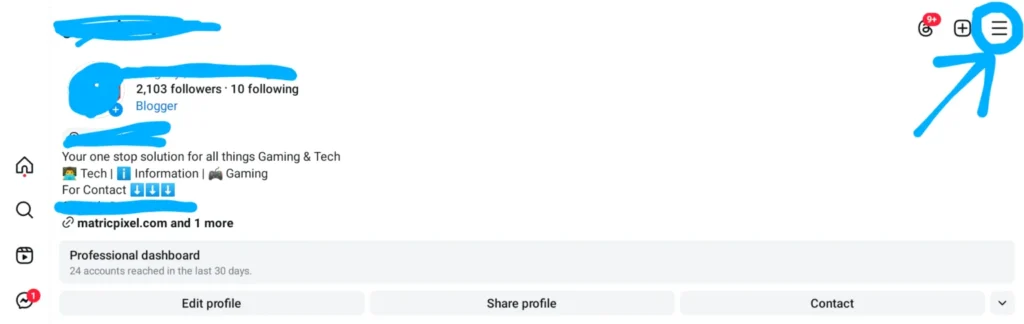
First, Open your Instagram app and login in your account and go on the profile section, click on the these three lines.
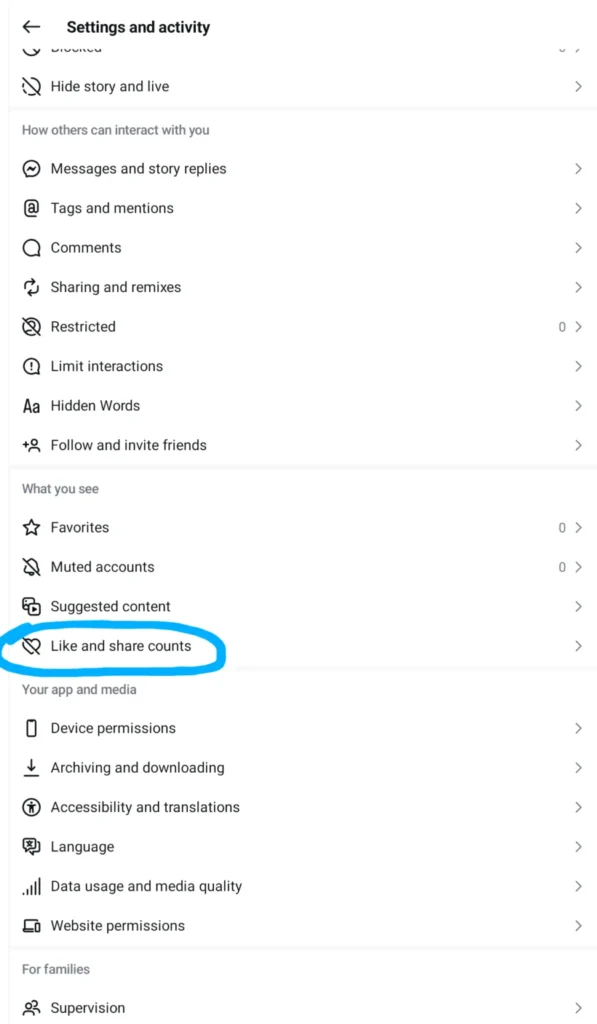
After Clicking on these three lines, you can see this type of interface and click on the Likes and share counts.
After doing this you can see a button of hide and unhide likes, when you turn this button on right side thats mean your Instagram all likes are hide, when you turn this button on left side thats mean your Instagram all likes is visible.

So, this is the way for doing hide likes on instagram in your smartphone device, you can easily apply this way to hide your Instagram account likes in your smartphone.
How to Hide Instagram Likes from Web –
If you wanna hide your Instagram account likes from your computer or laptop follow this step-by-step guide of how to hide instagram likes from web –
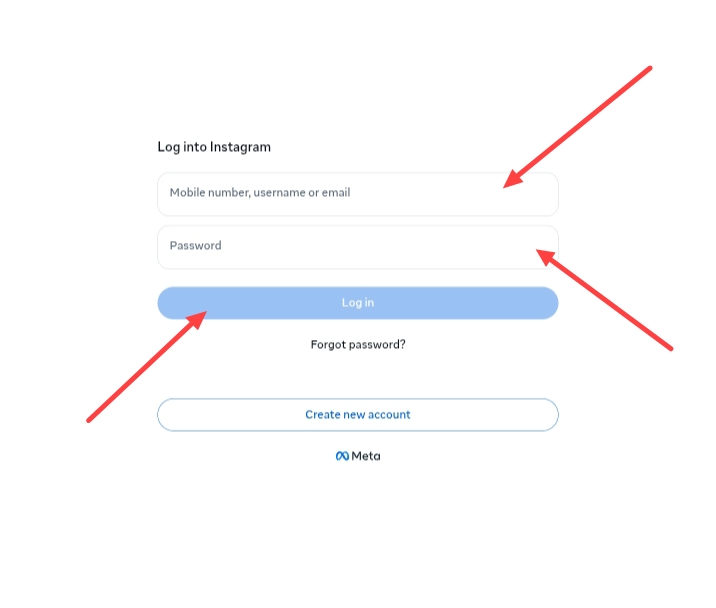
First, Open a web browser like Google Chrome, Microsoft Edge, Firefox or any other browser and type on Google Instagram Login then you can see this page https://www.instagram.com/accounts/login/, after clicking on this link you can see a login page of your Instagram account, after this first login your Instagram account.
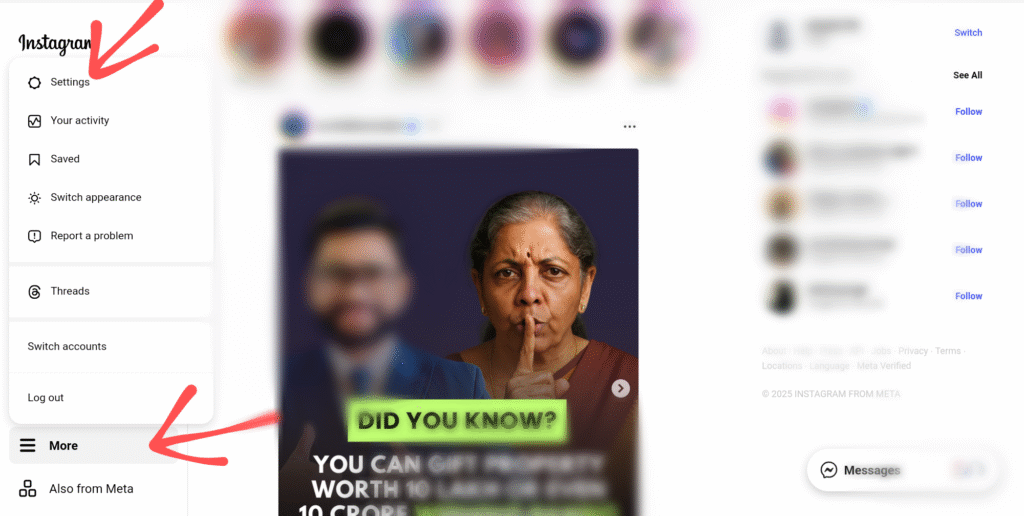
Then click on the More option, and after this you can see a option of Settings click on this.
After this you can see this interface, and after some scrolling in your Settings option you can see a Like and share counts option click on this.
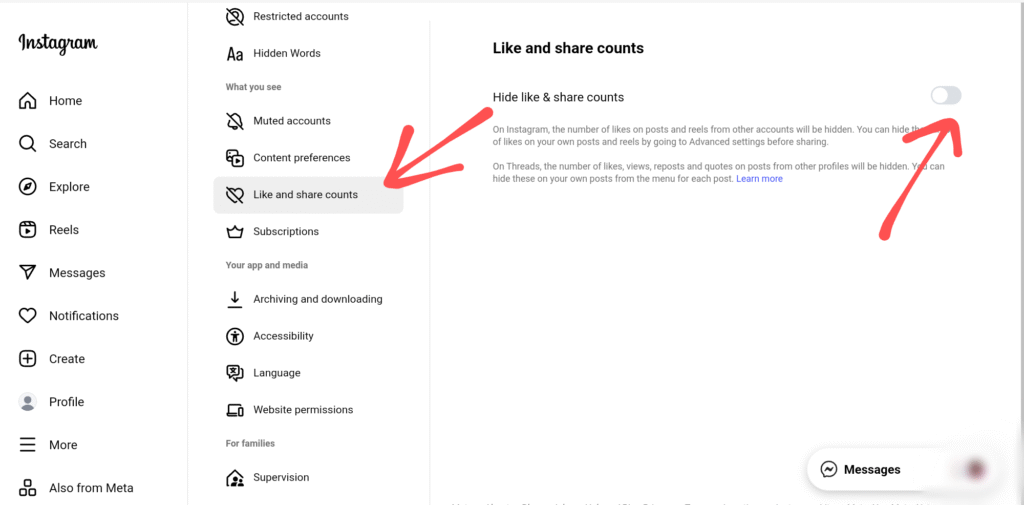
Then you can see a button of Hide likes & share counts simply open this and finally, your Instagram account likes has been hide.
So, this is the way of hiding likes on instagram with using computer or laptop devices, it is clear and full information guide about how to hide instagram likes from web.
FAQ –
Question; Can I remove likes from Instagram?
Answer; Yes, you can remove likes from Instagram, you can go to certain posts, or you can check the “Your Activity” option and look for specific posts and remove the likes.
Question; How do I hide my following list on Instagram?
Answer; No, you can do this action on Instagram. But you can find such features in third-party mod applications which allows you immense customization.
Question; Why can’t I see someone’s likes on Instagram?
Answer; The reason is the creators, or the owner of that particular post have turned on the option of hiding the likes.
This is the main reason you won’t be able to view the likes of other creators.
Question; Can you hide your activity on Instagram?
Answer; Yes, you can hide your Instagram activity from someone just doing some settings, if you wanna get clear guidence about this topic read this article how to hide Instagram activity.
Question; Does blocking someone on Instagram hide likes?
Answer; No, but comments and likes are automatically removed when you block someone on Instagram, likes are not hidden, they are automatically removed from your photos and videos, likes and comments of a person you have blocked.
Conclusion –
Social media platforms such as Instagram have grown widely, and it connects to the entire world, it offers many entertainment and helps in building a network and brand.
Instagram is gaining immense fame and people enjoy watching and creating short-form video content.
However, the App gained huge fame when TikTok got banned and earned users with its reel feature.
Instagram reel feature has made people easily create content and reach a wider audience.
Furthermore, Instagram has many flattering features like unlimited audio clips, free transitions, effects, and many more.