
At this time you can’t schedule tweets on twitter or X because in this time on platform X not available any type of scheduling option, if you wanna schedule your tweets with X app, you will have to do it use third-party tools like Planable, SocialPilot, Buffer or any other social media scheduling tool.
If you wanna schedule tweets from your but you don’t wanna use any other third-party tools and website you need to use web browser, login your Twitter or X account in any web browser then you can do this work.
In this article I will show you how to schedule tweets on twitter with using web browser, you can use dekstop or your android phone for browser for doing this task.
By the way, you can do this work with helps of other social media management tool like Buffer, and other third-party tool.
Reasons Why You Wanna Shedule Tweets on Twitter or X –
If you’re X user you wanna increase your business, your followers or anything you need to be highly activated on platform X, by the way, scheduling tweets on Twitter (X) can be highly beneficial for individuals, businesses, and content creators.
If you’ve multiple accounts to post tweets on X or you have not time to tweets on the same time then you can use this feature, you can create already your tweets for publishing and do schedule them on X, it is automatically published on time which you set.
By the way, everyone has different reasons to schedule tweets, it is the only example.
How to Schedule Tweets on Twitter or X –
If you wanna schedule tweets on Twitter or X without using any tool or website follow these steps –
First, Open your web browser in your phone or dekstop and search on google Twitter or X, after doing this you can see website of platform X, simple click on the website and login your twitter account.
After doing this all steps, you can see this type of interface, simple click on the Post icon.

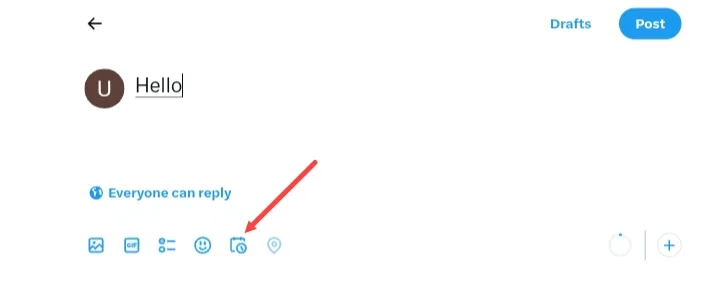
And write your tweet and click on the schedule icon.
After doing this, you can schedule your tweet when you wanna send your tweet, you can set month, day, year, hour and even also minutes, after set your time or date click on the confirm button.
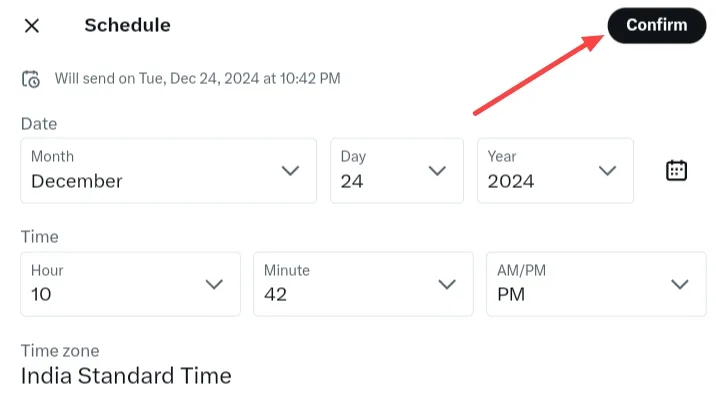
Finally, your tweet is scheduled, after doing this steps.
How to See scheduled tweets on Twitter or X –
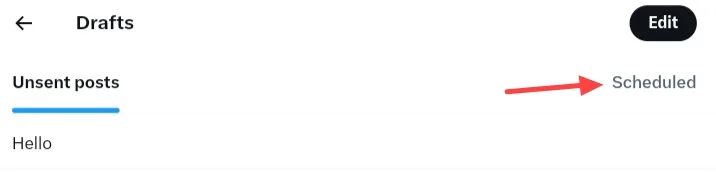
If you wanna see your scheduled tweet on twitter or platform X simply, click on the draft section after click on post button.
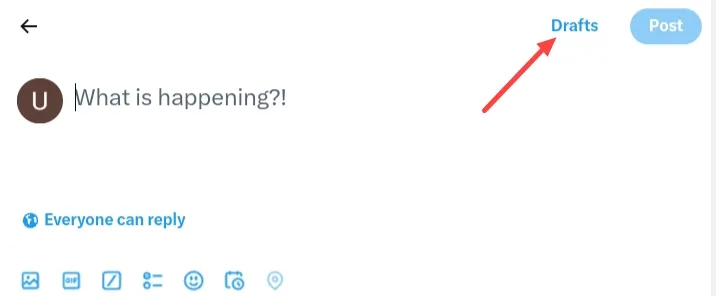
And Go To Scheduled, you can see your all scheduled tweets.
FAQ –
Question; Is there a way to schedule tweets on Twitter or X?
Answer; Yes, at this time on Twitter or X available post scheduling feature but it is available in only web, if you want to schedule your X posts in your smartphone you can use a web browser in your smartphone device like Google Chrome, Microsoft Edge, Firefox or any other browser.
Question; Can you schedule posts on X-Mobile?
Answer; Yes, you can schedule X posts easily with using any web browser in your smartphone device, if you wanna do schedule in your mobile, but use dekstop option in your mobile web browser.
Question; What is the X daily tweet limit?
Answer; According to platform X you can publish tweets or X posts 2,400 per day.
Conclusion –
It is the full process of scheduling tweets without using any third party app or tool to post on platform X, even you in this post I shared with you how you can see your already scheduled tweets on Twitter or X, if you have any question about this article you can ask me in comment box or you can do contact me our contact form.